Review Devious Machines Duck 2
I’ve been a big fan of Devious Machines for many years. Whether it’s Infiltrator 2, Texture, or the original Duck, their tools consistently show a strong understanding of what producers actually need. In my opinion, Infiltrator is one of the best sound design plugins available.
Sidechain ducking is a technique I use in almost every project. When producing demo tracks for my sample packs or building loops, getting the kick and bass to sit together properly is essential. Even when creating percussion loops with significant low-end content, it’s important that the bass frequencies don’t interfere with the kick drum later in the mix.
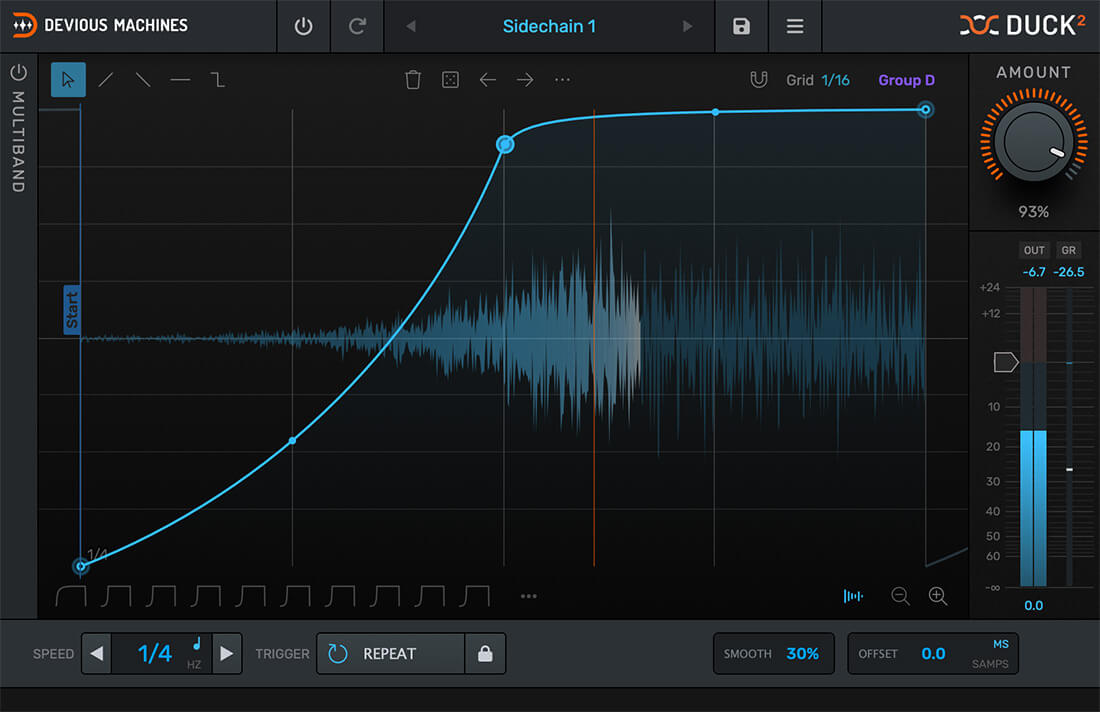
For this kind of work, I like to use Duck 2 because it gives me precise, visual control over volume movement. Instead of dealing with compressors, complex routing, or automation lanes, I can simply draw the exact volume curve I want and apply it to the signal. This makes shaping groove and timing fast, precise, and very intuitive.
Interface and Workflow
The reworked interface is clean, clear, and fully resizable. The preset browser includes tags, categories, and envelope previews, making it quick to find useful shapes. Duck 2 also comes with more than 200 factory presets, covering classic sidechain curves, gating patterns, tremolo styles, and rhythmic modulation shapes. Small workflow improvements such as undo and redo, copy and paste functions, and detailed metering make the plugin very efficient. The whole visual implementation is excellent and gives you very clear visual control over what is happening in the signal. The GUI feels polished, intuitive and makes working with the plugin genuinely enjoyable.
Envelope-Based Volume Shaping
At the center of Duck is its multi-segment envelope editor. Instead of adjusting compressor settings, I can draw precise volume curves directly on a timeline – works super fast! The envelope can run in sync with the project tempo or be triggered by incoming signals. Several editing tools make shaping curves fast and flexible. Paint tools allow quick creation of ramps, steps or gated shapes. Functions such as invert, reverse, repeat and randomize help generate variations quickly. Spline curves allow smooth transitions between points, and swing can be applied to the grid to add groove to rhythmic patterns. In practice Duck 2 behaves almost like an automated fader. Once the curve is drawn, the movement repeats perfectly every time.
Multiband Ducking
Duck 2 also includes a great multiband processing mode. The signal can be split into up to three frequency bands, each with its own envelope. This allows very targeted ducking. For example I can reduce only the sub frequencies of a bassline when the kick hits while leaving the mids and highs untouched.
A built-in spectrum analyzer helps position crossover points, and an optional linear phase mode avoids phase shifts when transparency is important. This approach keeps the mix clean while preserving the character of the original sound.
For me, the most exciting new feature in Duck 2 is the multiband ducking. It opens up fantastic possibilities for sound design and
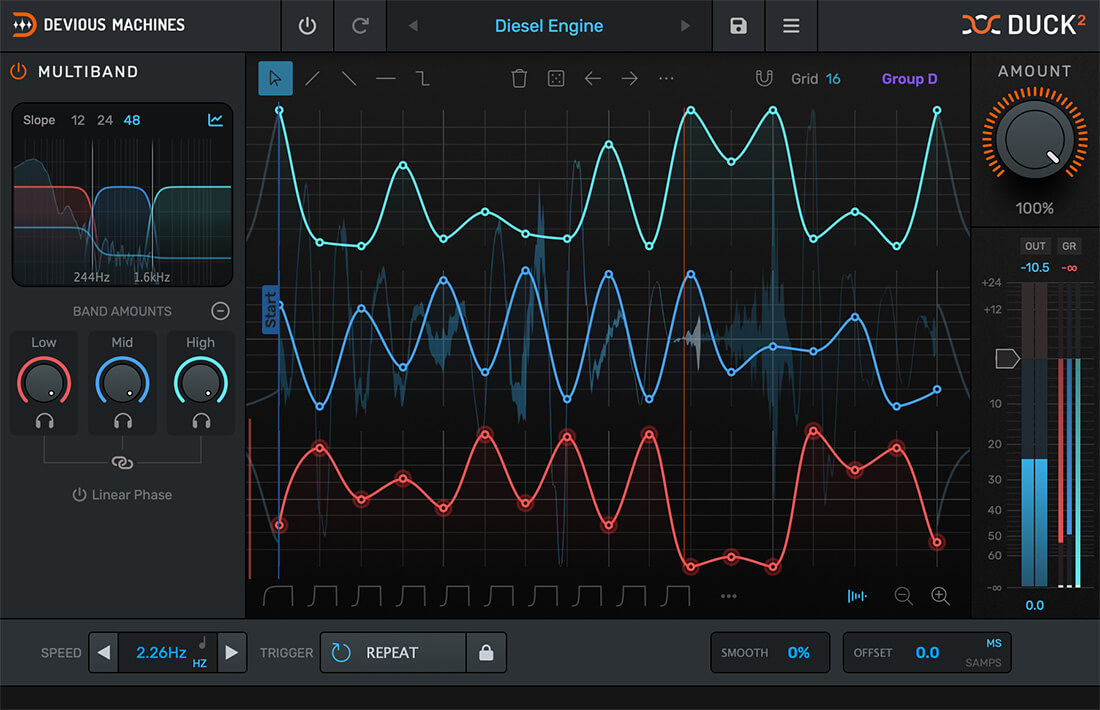
adds a lot of variety to the signal. I especially enjoy using it to push loops in completely new directions, resulting in mixes that sound cleaner and more interesting than before.
Envelopes from Audio
Duck can also generate envelopes directly from audio signals. I can drag an audio file into the plugin, and it analyzes the waveform to create a volume envelope that mirrors its dynamics. Dropping in a kick sample instantly produces a matching ducking curve. Envelopes can also be extracted from incoming sidechain signals. This allows very precise volume shaping based on real audio material. Great idea!

Flexible Triggering
Duck supports several triggering methods. The envelope can run in sync with the project tempo or be triggered via audio input, sidechain signals or MIDI. MIDI triggering combined with velocity scaling allows the ducking amount to react dynamically to performance. This flexibility makes it possible to create rhythmic modulation patterns that either follow the groove of the track or operate independently.
Groups and Workflow
Duck 2 now includes a group system that allows envelope shapes to be shared between multiple plugin instances. Up to four groups are available, which makes it easy to synchronize rhythmic volume movement across several tracks without recreating envelopes manually.
Together with features like flexible grid control, swing, randomization, and envelope presets, the workflow feels very fast in real production situations. It seems the developers have really thought of everything. This is far more than just a small update!
Creative Applications
These techniques make Duck useful not only for mixing tasks but also for creative sound design. They allow effects chains, for example, complex delay setups, to be shaped in ways that would be difficult or even impossible with traditional tools. With just a few simple adjustments, I can introduce movement and variation that make a signal feel more dynamic and alive.
This becomes especially interesting when combining and layering samples from very different sources. Controlling how elements interact is essential in those situations. Sidechaining plays a key role here, and Duck makes this process extremely fast and precise.
Duck has already been a standard tool in my workflow for years. I’ve used it to refine countless loops, shape grooves, and clean up overlapping elements in my projects, and that certainly won’t change here. If anything, Duck 2 expands these possibilities even further.
Within seconds, I can reshape grooves, reduce clutter in dense hi-hat patterns, or add subtle movement to otherwise static sounds. Nothing is more boring than static-sounding loops. For me, loops need to feel organic and varied, and Duck is a perfect tool to achieve exactly that.
Duck 2 also makes it easy to push loops into completely new rhythmic directions. Even simply browsing through the presets can be surprisingly inspiring, and using two instances together can lead to very interesting results. When it comes to clearing space in dense mixes while adding groove and motion, Duck 2 really makes a noticeable difference.
Verdict & Summary
Duck 2 combines precise envelope-based volume control with a fast and intuitive workflow. Multiband processing, flexible triggering and a large preset library make it suitable for both technical mixing tasks and creative sound design.
From my perspective as a sound designer working mainly with loops, tools that make groove control simple and reliable are extremely valuable. Duck 2 fits very naturally into that kind of workflow because I can shape volume movement exactly the way I want without spending time on complex routing or automation.
I also appreciate that the plugin encourages experimentation. Once you start using it beyond classic kick-bass ducking, it quickly becomes a versatile tool for shaping percussion, controlling effect tails or introducing subtle rhythmic movement to pads and atmospheres.
For producers working in electronic music where groove and clarity are crucial, Duck 2 is simply a very practical addition to the toolbox. In my view, it’s currently the best and most refined tool available for envelope-based ducking and precise volume shaping.
Considering its flexibility, ease of use and creative potential, Duck 2 delivers excellent value for producers and sound designers alike and earns the Sounds of Revolution Value Award. Overall, this tool impressed me in every aspect.

Visit my BLOG for other vst recommendations, production tips and more!
Cheers,
Oliver Schmitt aka Sounds of Revolution (SOR)