Review Forever89 Topos
Forever 89 Topos – Map-Based Saturation Plugin Review
Svante Stadler and Rikard Jönsson, the minds behind Forever 89, already made a strong first impression with their debut plugin Visco. I spent quite some time with it, and it felt like a genuinely fresh and inspiring approach to sound design. The idea of treating samples almost like a synth, morphing between them in a very visual and hands-on way, felt different from anything else out there.
Because of that, I was even more curious to see where they would go next. With Topos, they’ve now moved into the world of saturation and amp/speaker modeling, and I was really interested to find out if they could bring that same level of innovation to a more crowded category.
Sound & Concept
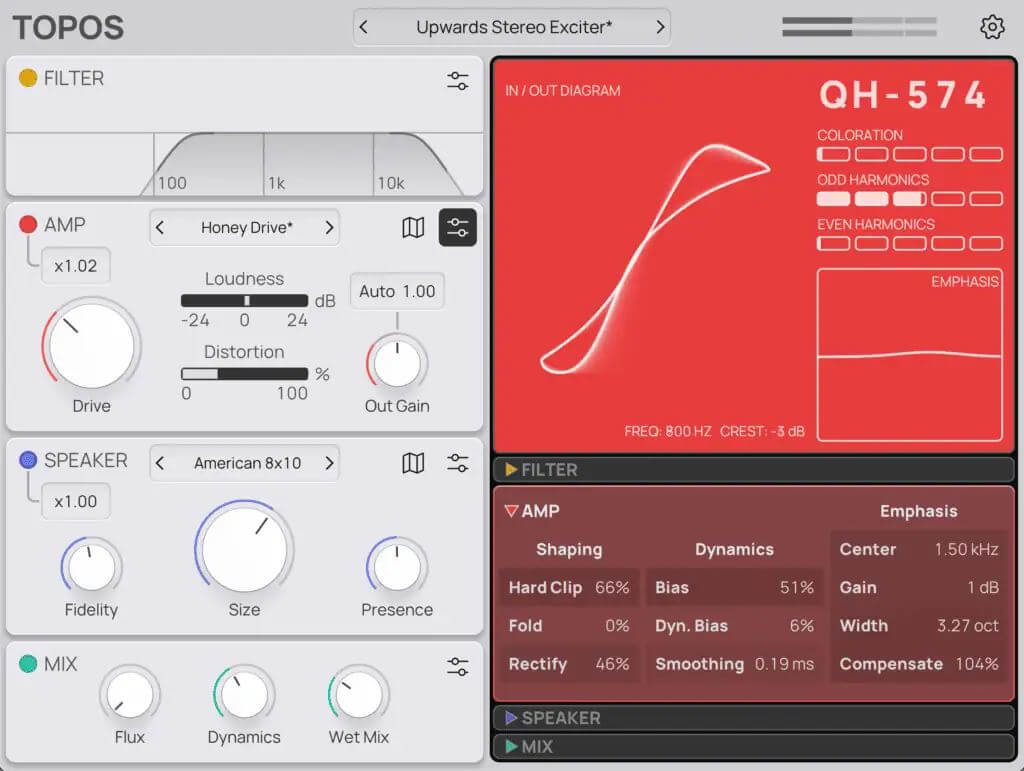
Topos combines amp saturation and speaker simulation, but the key difference is how you interact with it. You don’t just select models, you move between them.
Instead of jumping between presets, you can explore everything in between, and that’s exactly where Topos stands out. What makes this even more interesting is that it’s not just a simple crossfade between presets. The plugin actually interpolates between parameter values, so you’re getting real in-between states instead of just blending finished sounds. Many of the most interesting results don’t come from fixed points, but from blending multiple characteristics together.
It covers everything from subtle warmth to heavy distortion, but it stays surprisingly controlled and musical even when you push it. That’s something I really value, especially when working on drums and low-end material.
Workflow
Topos is very quick to get into. The amp section is straightforward, the speaker section adds instant character, and the map system immediately pushes you into experimenting.
One thing that became obvious very quickly is how different the workflow feels compared to many other tools. With a lot of saturation plugins, I often end up scrolling through presets until I find something usable and then start tweaking from there. That works, but it’s not very inspiring.
Topos takes a different route. The map-based system is very intuitive and gets you to a sweet spot much faster. Instead of searching for a preset, you move towards a sound. That makes a real difference in practice.
I was getting usable results almost immediately, often faster than with most other tools in this category.
One detail I really appreciated is the auto gain in the amp section. It keeps the level consistent, so you actually hear what the saturation is doing instead of being tricked by “louder = better”. That’s something not every plugin in this category gets right, or even includes at all.




Another thing I liked is that you can switch between a light and a dark theme. It’s a small detail, but it shows that some thought went into usability. I personally prefer the dark theme, as it’s much easier on the eyes during longer sessions. The GUI is also resizable, which is important. Being able to adjust the size makes a real difference in daily use, especially when working on different screen setups.
And that’s exactly what I want, especially in sound design. For me, it’s not about endless options hidden in menus. I’m not a fan of tools where everything is possible, but you lose time digging through layers of parameters.
Topos is the opposite. It keeps things simple on the surface, yet delivers high-quality results very quickly. The workflow really impressed me and is one of the strongest aspects of the plugin.
It works great on drums, synths, bass, and even full loops. I’ve been using it for far more than just drum processing. It’s one of those tools you can throw on almost anything.
One thing that slightly breaks the flow is that you can’t view or control the amp and speaker maps at the same time. You have to switch between them, which makes the exploration feel a bit more disconnected than it should be.
The Map System (Main Highlight)
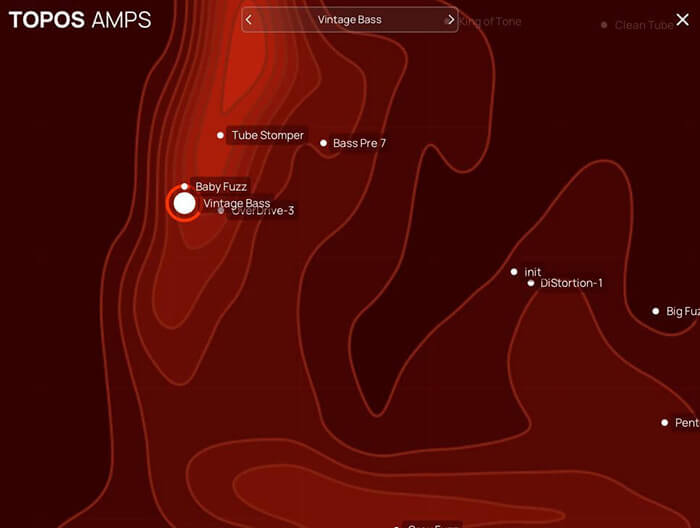
This is the core idea behind Topos. You move a node across a map and blend between multiple amp or speaker models.
Instead of switching presets, you morph between them, which opens up a completely different way of working. It feels more like exploring sound than dialing in parameters.
But there’s also a clear limitation.
The map cannot be directly automated, which feels like a missed opportunity. This feature is clearly designed for movement, yet in practice, it remains mostly static unless you resample.
With proper automation, this could push Topos to a completely different level.
Depth vs Simplicity
Topos strikes a very good balance here. The interface is clean and focused, but under the hood there’s a lot going on.
You can go quite deep if you want, shaping the saturation behavior, tweaking speaker characteristics, adjusting dynamics and transients, or using mid/side processing.
But you don’t have to. You can just dial in a sound and move on, and that flexibility is a big plus.
Sound Quality
This is where Topos really delivers. The saturation feels controlled, detailed, and modern. It doesn’t try to compete with ultra-detailed analog emulations, and that actually works in its favor. It focuses on flexibility and musical results, which in practice often end up being more useful.
The speaker section adds a sense of space and physical presence that goes beyond typical cabinet simulations. It’s not just about tone, but also about how the sound sits and projects in the mix.
Things That Could Be Better
There are a few limitations worth mentioning.
The biggest one is the missing automation for the map. There’s also no multiband processing, the mix control is global only with no per-section control, and the filter section is quite basic. None of these are deal-breakers, but they do limit flexibility in more advanced scenarios.
One workaround I found is using two instances, one focused on the amp and one on the speaker section. That way, you can effectively control both maps at the same time. It’s not ideal, but it works surprisingly well in more detailed sound design setups.
Topos Play (Free Version)
There’s also a free version called Topos Play.
It uses the same core engine but with a simplified feature set. You don’t get the full depth or the map functionality, but it’s a good way to get a feel for the plugin.
Verdict & Summary
Topos is one of the more interesting saturation plugins I’ve used in recent years.
It doesn’t try to be another analog emulation, but instead focuses on exploring tone in a fluid and modern way.
I personally enjoy tools like this a lot. They get me to usable results very quickly and keep the process creative.
Even though you can’t go as deep as with highly specialized tools, that’s often exactly what I need. Fast, inspiring, and effective. And Topos clearly delivers on that.
For me, Topos is less of a go-to “standard” distortion and more of a creative tool I reach for when I want to explore and shape tone in a more fluid way. And in that role, it clearly stands out.
Visit my BLOG for other vst recommendations, production tips and more!
Cheers,
Oliver Schmitt aka Sounds of Revolution (SOR)