Review Oeksound Soothe 3
Oeksound Soothe 3 Review – The Benchmark For Resonance Suppression
Oeksound released the original Soothe back in 2016, and it quickly became one of the most respected tools for resonance suppression and spectral processing in modern music production.
Now, with soothe3 (officially written as “soothe3”, but often searched as “Soothe 3”), Oeksound refined the concept even further.
I’ve been using Oeksound plugins for years. Soothe2 and Spiff have both become a permanent part of my workflow. In fact, Soothe2 became one of my favorite intelligent mixing and mastering plugins over the years, especially when dealing with harsh resonances, masking, layered percussion, drum processing, and field recordings.
Soothe2 also played an important role during the creation of the D16 PunchBox sound library – particularly for layered kicks, resonant percussion, and frequency buildups that conventional EQ couldn’t solve cleanly.
In this Oeksound Soothe 3 review, I’ll take a closer look at the new workflow improvements, the redesigned Soft Mode, sidechain processing, creative sound design potential, and whether the upgrade from Soothe 2 is actually worth it in real-world production environments.
I’m not a traditional mixing or mastering engineer, and that’s worth mentioning upfront. Most of my work revolves around sound design, sample creation, and field recordings, a very different context with its own specific challenges. Especially with field recordings, harsh resonances, sharp frequency buildups, and problematic masking can become constant issues. Fixing them manually with static EQ moves often takes time and rarely sounds fully transparent or natural. Soothe2 was one of the very few plugins that consistently solved these problems in a fast, intelligent, and musical way.
It also became extremely useful for layering sounds. Complex percussion, atmospheres, or textures can easily create unpleasant overlaps and masking issues, and Soothe often handled these situations far more elegantly than conventional EQ processing. That’s why I was genuinely excited to see Soothe 3 finally arrive.
What Is Soothe 3?
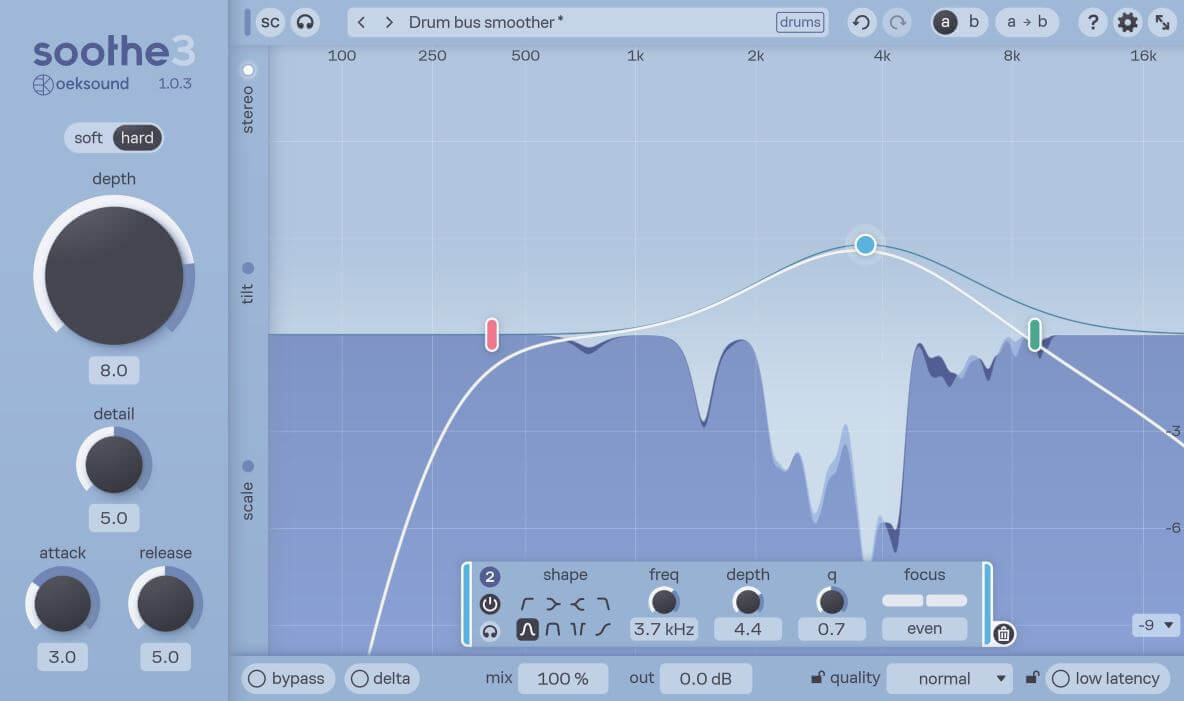
Oeksound Soothe 3 is a dynamic resonance suppressor that automatically detects and reduces harsh resonances, frequency buildups, and unpleasant peaks in real time.
What makes it different from a static EQ is simple: it only acts when something becomes problematic. A regular EQ notch sits there permanently – whether the harshness is present or not. Soothe constantly adapts to the incoming signal and reacts only when needed. The source stays natural, and the processing stays invisible.
Typical applications include:
- Harsh vocals
- Muddy low mids
- Sharp cymbals
- Resonant synths
- Piercing sibilance
- Problematic field recordings
- Layered sound design
- Kick and bass sidechain processing







The Biggest Difference Compared To Soothe2
One of the biggest improvements for me is clearly the workflow.
Soothe2 already sounded fantastic, but some controls felt a bit technical to dial in properly. The combination of “Sharpness” and “Selectivity” in particular wasn’t always immediately intuitive. In Soothe 3, both were replaced by a single “Detail” control. It sounds like a small change, but in practice, it makes the plugin noticeably faster and easier to dial in – one of those updates where you immediately feel the difference.
Oeksound also redesigned the underlying algorithm. The new Soft Mode now reacts relative to the overall frequency balance instead of simply targeting loud peaks. It also uses an adaptive threshold rather than a fixed one, responding relative to the incoming signal level rather than a static cutoff. The result feels noticeably smoother and more transparent than before – especially on dynamic material.
Another improvement that stands out in my workflow is how Soothe 3 handles transients. Soothe 2 could occasionally introduce a slightly smeared, sandy quality to attacks – something that became particularly noticeable when working on drum loops and percussive material. Soothe 3 simply doesn’t do this. Transients stay tight and defined, even under heavier processing, which makes a real difference when punch and clarity matter.
Hard Mode is still available for more aggressive processing and remains excellent for sidechain applications and creative sound shaping. I like to switch to this mode when I want to steer the signal in a completely different direction.
What’s worth adding: Soft Mode holds up surprisingly well even under heavier processing – you can push it further than expected before anything starts to feel unnatural. Hard Mode is there when you need a different approach entirely. Together, they cover two very distinct workflows: one focused on transparency, the other on deliberate intervention.
The new Tilt controls deserve more than a passing mention. They allow you to shape the behavior of Detail and Attack differently across the frequency spectrum – for example, making bands narrower in the highs while keeping them broader in the lows. In practice, this means you can dial in fine, precise resonance suppression in the upper frequencies while maintaining a smooth, natural feel in the low end. For anyone working with layered textures, field recordings, or complex percussive material, this kind of frequency-dependent control is genuinely useful. It’s one of those features that sounds subtle on paper but makes a real difference once you start working with it.
Sidechaining
One of the strongest aspects of Soothe has always been sidechain processing.
Using a kick drum to dynamically create space inside a bassline, or feeding vocals into dense instrumentals, works extremely well and often feels smoother than static EQ ducking approaches. Especially in electronic music productions with dense layering, this can become a very powerful tool.
I’ve also been experimenting with the sidechain input more than I expected to. One setup that’s become genuinely useful in my layering work: routing a vocal or lead element as the sidechain source into a dense instrument bus. Soothe 3 then dynamically creates space exactly where and when it’s needed – far more organic than drawing volume automation or cutting static notches. The same principle works beautifully for kick and bass relationships, letting the kick breathe without permanently thinning out the low end. For both of these applications, Hard Mode is the better choice – it reacts with more conviction, which is exactly what you want when the sidechain needs to drive the processing.
Linear Phase & Creative Sound Design
One thing that genuinely caught me off guard while working with Soothe 3 was its creative potential for sound design.
Combining Linear Phase with Ultra quality settings, aggressive Hard Mode and sidechain processing can produce fascinating metallic textures and resonant artifacts. In some cases the processed signal starts to take on a character that’s almost unrecognizable from the original, which depending on what you’re going for, is exactly what you want.
These kinds of sounds work extremely well as additional layers for impacts, drones, percussion or experimental textures. This is clearly not what soothe 3 was designed for, but for sound designers it opens up a surprisingly deep rabbit hole worth exploring.
Faster & More Streamlined
Soothe3 simply feels more modern overall. The interface is cleaner, fully scalable, and easier to navigate – and honestly, it just looks great. The redesigned GUI is a noticeable step up from Soothe2, both in terms of usability and visual polish.
Beyond the interface updates, the overall workflow just feels faster and more considered than before. The new node handling and reorganized controls mean less time tweaking and more time actually working – which, across a full session, adds up quickly.
Bands can now be added and removed freely – the six fixed bands from Soothe2 are gone, replaced by a cleaner, more focused layout where only what you actually need is on screen. A new Bandpass filter type has also been added, which makes it easy to isolate a specific frequency range and apply suppression only there. If you’re dealing with a harsh resonance at a very specific point in the spectrum – say, around 2.5 kHz on a vocal or a metallic ringing on a cymbal – this is exactly the kind of surgical tool that makes the job faster and cleaner.
The new Max Cut control lets you set a hard ceiling on how much the plugin can attenuate at any point. If you’ve ever pushed Soothe too hard and lost control of how aggressively it was processing, this is the answer. It’s a small safety net that adds confidence when working at more extreme settings.
One feature worth mentioning: the Delta mode lets you monitor exactly what Soothe 3 is removing from the signal. A simple but invaluable sanity check, especially when working with subtle material like field recordings or acoustic sources.
Another important addition is the new low-latency mode: This is, in my opinion, the plugin’s true standout feature. Soothe 3 can operate with only ~1ms of latency, enabling live use on stage – for example, processing guitar or vocals in real time. Most other spectral EQs, including Fab Filter’s Pro-Q 4 implementation, which runs in linear phase mode, simply aren’t capable of this. And this is more significant than it might initially seem: earlier versions were primarily mixing tools. Being able to monitor vocals while tracking or run synths through Soothe 3 in real time fundamentally changes how the plugin fits into a session – particularly in smaller home studio setups where performers are listening back through the DAW.
Soothe3 also now supports multichannel and immersive audio formats up to Dolby Atmos configurations. Personally, that’s not something I need in my day-to-day work, but for music producers working in film, TV, or post production, this is going to be a genuinely useful addition.
Soothe 3 and the Competition
Several tools come up regularly in the same conversation as Soothe, and it’s worth addressing them directly – because the market for resonance suppression and spectral processing has grown considerably over the last few years.
Soundtheory Gullfoss
Probably one of the most common comparisons, but the two plugins do fundamentally different things. Gullfoss analyzes the signal against an internal “ideal image” and applies both boosts and cuts to improve overall tonal balance. Soothe only subtracts. That distinction defines the entire use case.
Gullfoss works best when something feels diffuse and hard to pinpoint – when the problem is “this mix feels uneven” rather than “that frequency is driving me crazy.” Soothe is for the second scenario. Faster, more targeted, and with a clearer result on individual sources. A simple shorthand: something’s annoying → Soothe. Something feels unbalanced → Gullfoss.
What tips it decisively for me is transparency. The new Soft mode in Soothe 3 is remarkable in this regard – the processing disappears into the signal in a way Gullfoss simply can’t match. Gullfoss has a sound. You can hear it working. On individual tracks, that broader character becomes a problem when what you actually need is invisible subtraction. Soothe 3 in Soft mode leaves almost nothing behind except the fix.
I work primarily with individual tracks and loops, and in that context, Soothe 3 is the clear default. Even on a stereo bus, when the goal is resonance suppression rather than tonal reshaping, Soothe 3 remains the more controlled and transparent choice. For that specific job, it’s not a close call.
Waves Curves Equator
An interesting option, especially at its price point. It covers the basics of resonance suppression and adds some useful features like sidechain-based frequency unmasking. For simpler tasks it gets the job done, but it doesn’t come close to the transparency and precision of Soothe 3 under heavier processing.
Baby Audio Smooth Operator
Genuinely well-designed – clean interface, fast workflow, and the Low and High Preservation approach to limiting the processing range is a smart idea. It’s a solid tool, particularly for producers who want something approachable. But when pushed harder or used on more complex material, Soothe 3 simply handles the job with more finesse and fewer artifacts.
Three Body Technology SpecCraft
One of the more ambitious plugins in this space, with innovative features like spectral compensation, formant preservation, and profiling. For the price, it offers solid value and is surprisingly accessible for a Three Body Technology product. But pushed harder or used on more complex material, the processing can feel less controlled than you’d want – and that’s exactly where Soothe 3 pulls ahead decisively. A reasonable option if budget is a concern, but in a direct comparison, it’s not a close race.
FabFilter Pro-Q 4
A different conversation entirely. It’s one of the best EQs ever made, and the dynamic EQ functionality introduced in version 4 does overlap with some of what Soothe handles. For certain tasks, Pro-Q 4 is absolutely the right tool – and the fact that it combines a world-class static EQ with spectral processing in a single plugin makes it uniquely powerful. But it’s still a general-purpose EQ at its core. When it comes to resonance suppression specifically – moving resonances, dense harsh material, constantly shifting spectral problems – Soothe 3 is simply faster and more focused. I’ve done direct A/B comparisons on my own material, and the results from Soothe 3 in the new Soft mode consistently sound better in that specific context. The two plugins sit comfortably in the same toolkit without replacing each other.
Do Soothe2 Users Need The Soothe 3 Upgrade?
In my opinion: yes, especially if you use Soothe as a core part of your workflow and not just here and there.
Soothe 2 is still an excellent plugin and absolutely capable of professional results. Oeksound didn’t reinvent the core idea with Soothe 3. Instead, they refined and modernized it in very meaningful ways.
The biggest improvement isn’t a single headline feature. It’s the overall experience of using the plugin. The redesigned Detail control is faster to dial in. Soft Mode sounds more natural on dynamic material. The overall workflow feels more refined throughout. On cymbals especially, the difference is immediately noticeable – Soothe 3 handles them with significantly more finesse than its predecessor.
Where Soothe 2 could occasionally feel like it was working against the material – particularly when pushed harder, sometimes leaving things sounding slightly over-processed – Soothe 3 just doesn’t have that problem. You can push Soothe 3 considerably harder, and it still sounds controlled and transparent. On vocals in particular, it’s remarkably easy to dial in and stays natural even at more aggressive settings. For anyone working with drums, loops, or percussive material, the cleaner transient handling is a particularly compelling reason to upgrade – it’s the kind of difference that shows up immediately in a real session.
Of course, if you only use Soothe occasionally for basic vocal cleanup, Soothe 2 will remain a fantastic tool for years to come. But for anyone working with it regularly, in dense productions, sound design, modern electronic music, or professional mixing environments, the upgrade is absolutely worth it. And if you’re working in multichannel or immersive audio, it’s an even easier decision.
One practical note: there’s no need to uninstall Soothe 2 after upgrading. Both versions can coexist on your system, which is useful if you need to reopen older projects. Just keep in mind there’s no backwards compatibility between the two – but given that the engine and the underlying sound have changed, that’s entirely reasonable.
One thing worth keeping in mind though: Soothe 3 rewards a targeted approach. Drop it on too many tracks without a clear reason, and the mix can start to feel unnaturally smooth and lifeless. Dial it in, then consider pulling Depth and Detail back slightly. Restraint is part of the workflow.
Verdict & Summary
Soothe was the first plugin of its kind and, even years later, it remains the best tool in this space – and I say that having most of the relevant tools on my system, including Pro-Q 4, Gullfoss and Curves Equator, to name just a few.
With Soothe3, Oeksound refined the concept in exactly the right areas: better workflow, improved usability, more flexibility and a more polished overall experience. Most importantly, it simply sounds more transparent than its predecessor – and the improved transient handling is a genuine step forward, especially for anyone working with drums, loops or percussive material.
Soothe 3 isn’t cheap – no point glossing over that – but if you already own Soothe 2, the upgrade price is very reasonable, and once you factor in the time it saves across production, mixing and sound design work, the cost starts to feel justified pretty quickly. The new low-latency mode opens up real-time tracking and live use – cases that simply weren’t possible before.
Oeksound also offers a fully featured 20-day trial, and I highly recommend checking out the great audio demos on their website. Just make sure you’re on proper monitors or good headphones to really hear the difference in transparency and detail.
If you’ve been on the fence about upgrading, the trial is the easiest way to convince yourself. Once you hear it on your own material, the decision tends to make itself.
For me, Soothe 3 absolutely deserves the Sounds of Revolution Award.

Visit my BLOG for other vst recommendations, production tips and more!
Cheers,
Oliver Schmitt aka Sounds of Revolution (SOR)