Best Free VST Plugins
Let’s be honest: the plugin market can be overwhelming, and it is easy to assume that quality always comes with a price tag. But that is simply not true. Over the years I have come across a handful of free tools that have earned a permanent place in my sessions, not because they were free, but because they genuinely deliver.
Some are utility tools, some are creative effects, and some do things that even paid alternatives struggle to match. What they all have in common is that they work, they sound good, and they make the job easier.
No compromises. No second-best solutions. Just great plugins that happen to cost nothing.
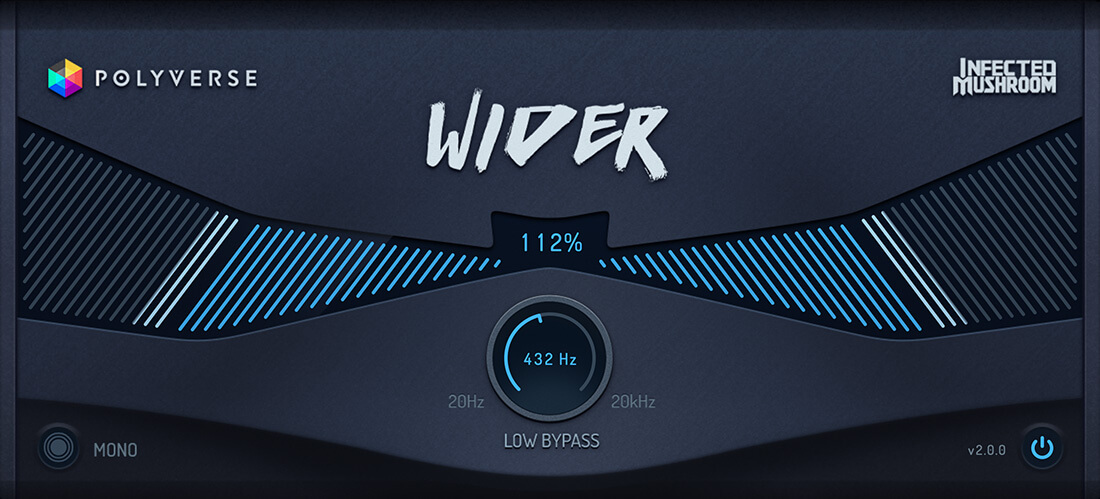
Polyverse MusicWider 2.0 – One of the best free stereo wideners
Polyverse Music is one of those developers that genuinely excites me. Their approach to sound design tools is creative, precise, and always musically meaningful. If you have not tried Supermodal or Filterverse yet, both are outstanding examples of what this company is capable of. So when Polyverse releases something for free, it is worth paying attention to.
Wider 2.0 actually has its roots in the stereo width engine of Polyverse’s well-known Manipulator pitch shifter, now extracted into its own dedicated plugin. That background explains a lot about how refined and controlled the widening feels in practice. The width goes beyond the standard 100 percent stereo image, pushing further into genuinely expansive territory without the phase problems that usually come with that kind of processing. I have tested several paid wideners over the years and honestly have not found a compelling reason to move away from this one.







The plugin is built around one simple idea: make mono signals wide without causing phase problems. And it genuinely delivers. The algorithm keeps the signal phase-coherent even when summed back to mono, which means you can push width quite far without your sound collapsing in the mix.
Sonically, it feels natural rather than artificial. Pads, arps, vocals, and percussion all open up nicely without that hollow, over-processed feeling that cheaper wideners tend to introduce. Subtle use is key though. Push it too hard and things start losing focus.
Version 2 adds two features that make a real difference. The Low Bypass control excludes low frequencies from the widening process, so your kick and bass stay tight and centered while everything above spreads out freely. No extra routing, no EQ splitting needed. The Mono Check button lets you instantly audition your signal in mono, simple but genuinely useful in everyday workflow.
The interface is clean and immediately inviting. Everything is visible at a glance, and there is no learning curve whatsoever. One Width knob, Low Bypass, and Mono Check. Drop it in, turn the knob, done. There is no gain compensation, which makes A/B comparisons slightly awkward, and at extreme settings you can hear minor changes in mono, but nothing dramatic.
Wider 2 is the kind of plugin that just lives in your template. It solves a real problem cleanly and stays out of the way.
Verdict: One of the best free stereo wideners available. If you need reliable width without phase headaches, this is a no-brainer. I love to use it!
Ozone Imager V2 – stereo imaging
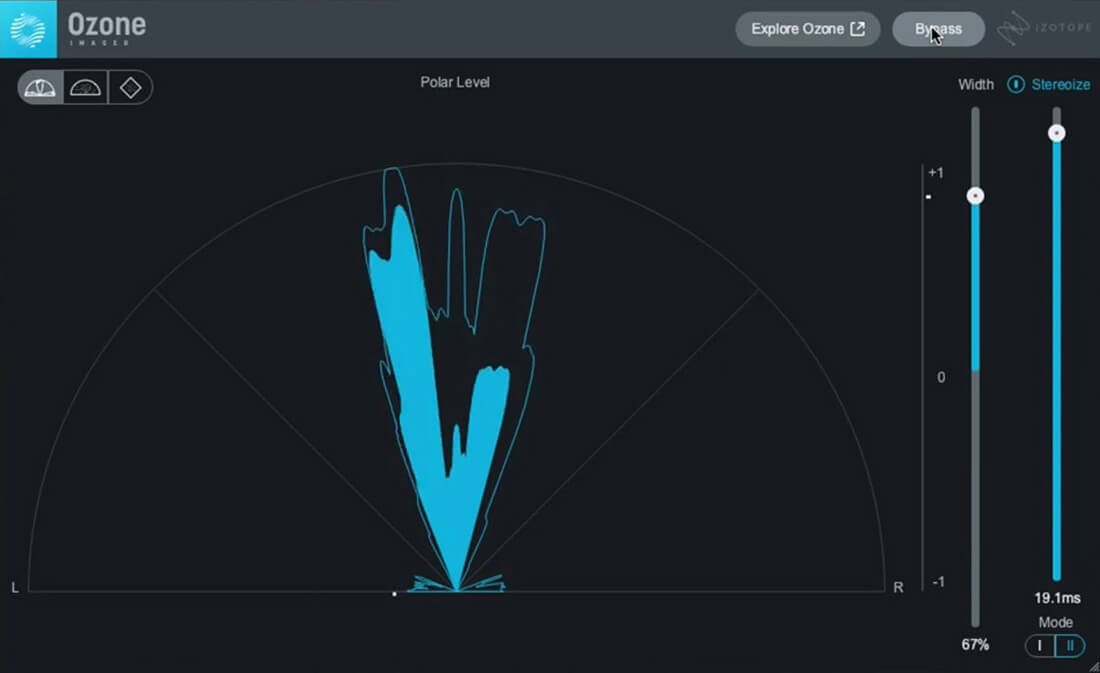
Ozone Imager 2 is a free stereo imaging plugin built from iZotope’s Ozone engine. The idea is simple: control stereo width and turn mono into stereo, without complicated routing or tricks. And that’s exactly why it works so well.
I use it quite a lot, mainly because it just gives usable results with almost no effort. One Width fader, Stereoize on/off with two modes, and a clean resizable interface. That’s it. No deep menus, no learning curve. You drop it on a track and immediately get results.
The widening sounds clean and controlled and doesn’t feel overly artificial unless you really
push it. The Stereoize function is also surprisingly useful: Stereoize II is more subtle and transparent, Stereoize I adds more character with a slightly phasey feel. That gives you both a clean option and a more creative one.
One of the strongest points is the visual feedback. Three vectorscope modes show stereo width, channel balance and phase correlation. Especially helpful when working fast or checking mono compatibility.
There are a few limitations: the feature set is basic, there is no multiband control, and Stereoize can show artifacts if you push it too far. But Ozone Imager 2 is not trying to be a high-end mastering tool. It does one job well, and honestly that’s exactly why I like it.
Verdict: If you want quick, clean stereo width with minimal effort, this is an easy recommendation.
Xfer OTT Multiband UP/DOWN COMPRESSOR
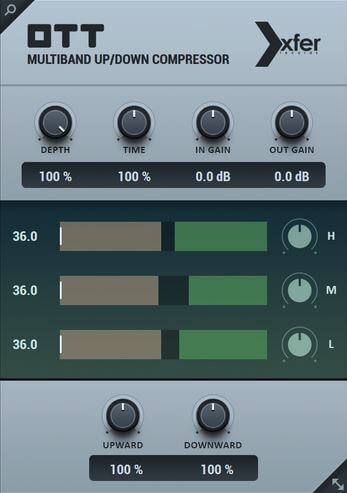
OTT by Xfer Records is one of the most widely used free plugins in electronic music production. The plugin recreates the famous “over-the-top” multiband compression preset from Ableton Live and makes it available as a standalone plugin for any DAW.
OTT splits the signal into three bands (low, mid and high) and applies both upward and downward compression. Quiet parts are boosted while louder parts are controlled, resulting in a dense and very energetic sound. Because of this aggressive processing, OTT is not meant to sound subtle.
Instead, it is perfect for modern electronic music and sound design, where producers often want bold and powerful sounds. It works especially well on synths, basses, pads, leads and drum sounds, instantly adding presence, brightness and detail.
The interface is very simple and offers just a few essential controls such as Depth (dry/wet), Time (attack and release), and input/output gain.
Bottom line: A legendary free plugin that can instantly make sounds bigger and more powerful. A must-have tool for many electronic music producers. Simply a classic!
Valhalla Supermassive – delays and reverbs
There are not many free plugins that feel like they belong in a professional setup from day one. Valhalla Supermassive is one of them. Released in 2020 by Valhalla DSP, a company well known for its paid reverb processors, Supermassive was built specifically for large-scale delays and reverbs. Years later it is still being updated, now sitting at version 5.0.0 with 22 reverb and delay modes on board.
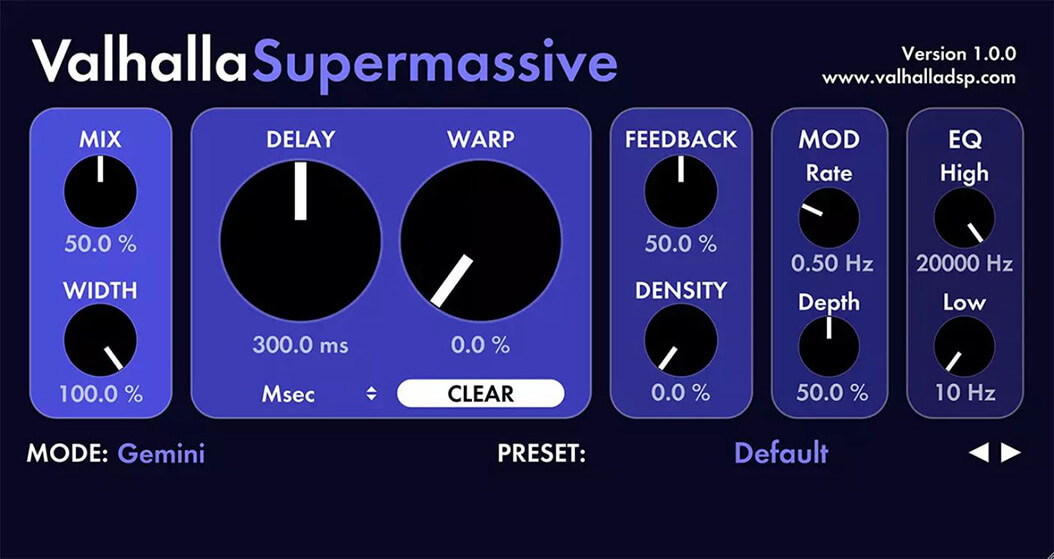
The controls are straightforward: Delay time with tempo sync, a Warp knob that spreads the internal delay lines apart and transforms echoes into reverb, Feedback for decay length, Density for how thick the reflections get, modulation rate and depth, and output filters.
Everything is labelled clearly and tooltips explain each parameter on hover.
The real personality comes from the modes. Each one is a different algorithm with its own attack, decay and density character. Gemini hits fast and tight. Andromeda builds slowly into something vast.
Great Annihilator sits in between, dark and deeply atmospheric. Newer additions like Scorpio, Libra and Leo bring filtered feedback paths into the mix for more naturalistic tails, while the latest mode Sirius focuses on clean, transparent reverb with a wide density range.
Presets are organized into Echoes, Modulations, Reverbs and Special Effects, covering everything from rhythmic delays to drones and sound design textures. It works on pretty much anything: synths, guitars, vocals, drums.
I use Supermassive regularly in my own productions, and it has earned its place there purely on sound quality. For a free plugin, that says everything.
Verdict: Download it. There is no reason not to.
Valhalla Space Modulator – More than a flanger
Valhalla DSP has built one of the strongest reputations in the plugin world, and Space Modulator is a perfect reminder of why. The fact that it is completely free makes it even more remarkable.
At its heart, Space Modulator is Valhalla’s take on flanging. But calling it just a flanger would seriously undersell what it actually does.
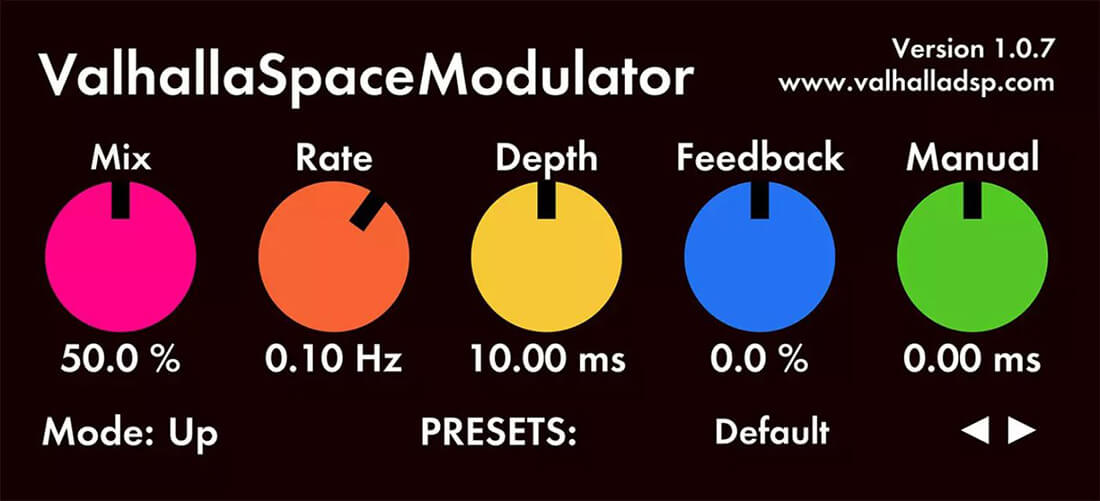
Eleven algorithms cover through-zero flanging, barberpole flanging, detuning, doubling, strange echoes and reverbs, plus effects that are genuinely hard to put a label on. Five controls handle the essentials: Mix, Rate, Depth, Feedback and Manual, the latter adding pre-delay to the modulated signal.
What keeps me coming back to this plugin is how far it goes beyond the obvious. On drums it can subtly widen a snare across the stereo field or completely transform a loop into something mechanical and cinematic. On guitars it adds presence and spread without feeling processed. And when you start pushing it on percussion or more experimental material, things get genuinely trippy in the best possible way.
It is one of those plugins where you load a preset, immediately hear something unexpected, and end up going down a rabbit hole for an hour.
The over 80 included presets are a great starting point and cover a serious range of territory. But even just working the five controls manually gets you somewhere interesting fast.
Whether you use it for subtle mix decisions or full-on sound design, Space Modulator earns its place in any session.
Verdict: More than a flanger. A creative tool that punches well above its price, which happens to be zero.
Lunacy Audio Haze – More than a chorus effect
Lunacy Audio is not a name you hear every day, but once you come across their plugins you start paying attention. I have been a big fan of their Beam 2.0 and the CUBE synthesizer for a while now, so when they announced Haze as a free tool, my expectations were already high.
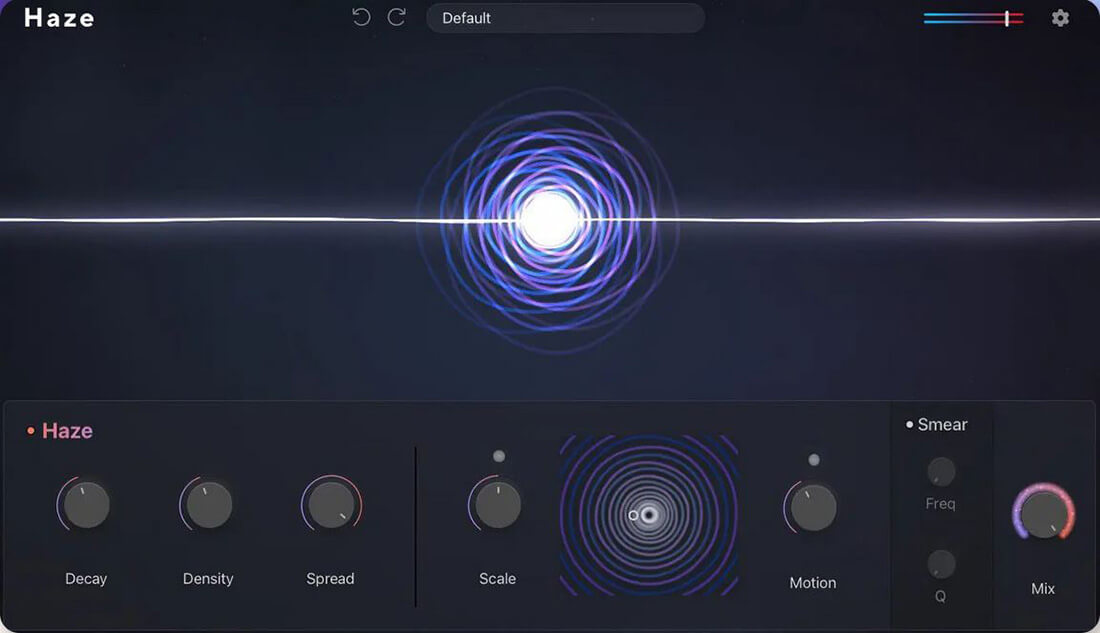
On the surface, it looks like a chorus effect. But what it actually does is combine chorus, phasing, algorithmic reverb, and delay into something that feels more like an atmosphere engine than a standard modulation tool. The heart of it is what Lunacy calls the Spectral Dispersion Engine, and it is what separates Haze from anything in the same category.
The interface is divided into three sections. The first handles the spatial side: Decay for tail length, Density for texture, and Spread for stereo width. The second shapes character and movement: Scale shifts the overall tone and size of the space, while Motion introduces modulation with tape-like flutter and harmonic drift. That section also doubles as an XY pad, which is a nice touch. The third section is the Smear filter, a resonant spectral effect controlled by Frequency and Q that pushes things into genuinely dreamy territory.
What stands out in practice is how musical the results are. On pads and synths it adds width and depth without sounding artificial. On vocals it creates movement that feels organic rather than processed. On something as dry as a piano or electric Rhodes it opens up a whole new dimension. The 20 included presets cover a solid range from subtle chorus to warbly tape textures to washy hall-style reverbs, and they are a good starting point for exploring what the plugin can actually do.
The GUI deserves a mention too. It is visually striking and clearly designed with care, which makes working with it genuinely enjoyable. For a free plugin, Haze is remarkably complete. Lunacy Audio is definitely one to watch.
Verdict: More than a chorus effect. A versatile atmosphere tool that earns a permanent spot in the toolkit.
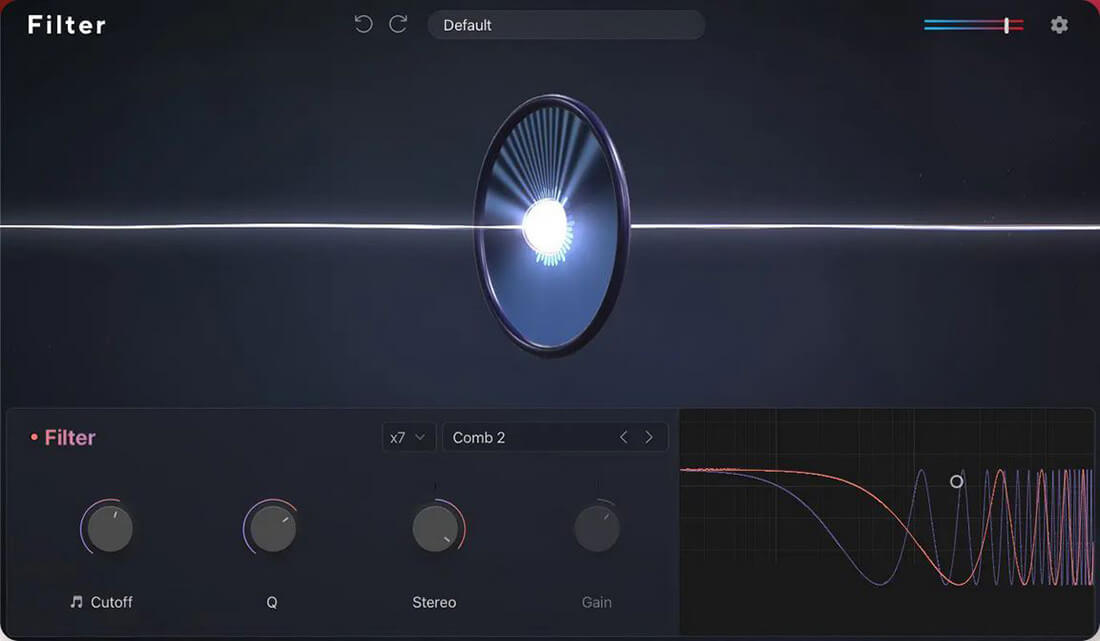
Lunacy Audio Filter – Classic filters, creative options
Lunacy Audio has a knack for releasing tools that feel more complete than you would expect for the price. Filter is no exception, and the fact that it is completely free makes it even harder to overlook.
At its core, Filter covers all the classic state variable filter types: lowpass, highpass, bandpass, low shelf, bell, high shelf, peak and notch. That alone would make it a solid utility plugin. But what makes it genuinely interesting are the extras. Comb and formant filters bring a more creative dimension to the signal processing side, opening up possibilities well beyond standard EQ work.
The slope scaling is a standout feature. With 1x to 8x scaling options you have real control over how aggressively the filter affects the signal, from gentle curves to steep surgical cuts. The note snap function is another thoughtful addition, locking the filter frequency to musical pitches, which is surprisingly useful when working with melodic material or when you want filtering to feel intentional rather than arbitrary. Stereo image shaping rounds things out and adds another layer of control over the final sound.
Twenty presets are included and serve as a solid starting point, whether you are looking for a specific tone or just want to explore what the plugin can do.
As with everything from Lunacy Audio, the plugin is available in VST, AU and AAX formats, so compatibility is not an issue regardless of your setup. For a free filter plugin, this covers a lot of ground cleanly and without unnecessary complexity.
Verdict: Classic filters, creative options and smart extras. An easy addition to any plugin folder.
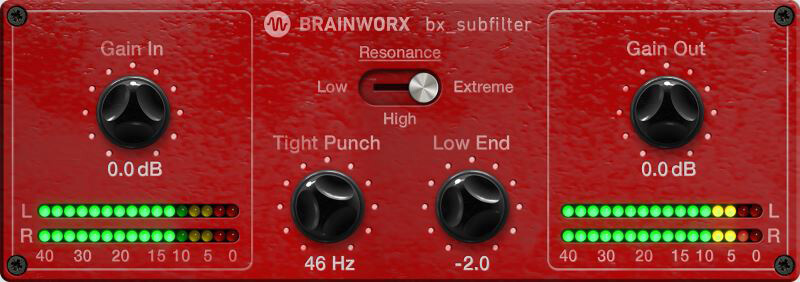
Brainworx bx_subfilter – low-end utility
Brainworx is a name that carries serious weight in the mixing and mastering world, so when they offer something for free it is worth a closer look.
The bx_subfilter is exactly that: a focused, no-nonsense low-end tool that solves a very specific problem remarkably well.
At its core it is a resonant high-pass filter with a simple four-knob interface. The Tight Punch control sets the cutoff frequency, Resonance shapes the peak at that point, and the Low End control lets you boost or cut the frequencies sitting beneath. Three resonance modes, Low, High and Extreme, give you control over how aggressively the filter behaves. That is essentially it. No deep menus, no complexity.
What makes it genuinely useful in practice is how quickly it cleans up low-end problems that would otherwise take a chain of EQ moves to fix. The classic scenario is a bass competing with a kick drum, everything below 100Hz turning into an indistinct mess. Dropping the bx_subfilter in, dialing in the cutoff and adding a touch of resonance at the right frequency can separate those elements almost instantly. You could achieve something similar with a high-pass filter and a separate peak boost, but having it in one focused plugin makes the decision faster and the result more predictable.
It is worth being careful not to overdo it. The resonance can add a lot of energy quickly, and checking the results on headphones and with a spectrum analyzer is a good habit. But used with restraint it adds real definition and punch to bass tracks, kicks and 808s without touching the rest of the signal.
For a free plugin it is a surprisingly surgical tool. Not something you reach for on every session, but when you need it, nothing else feels quite as direct.
Verdict: A simple, effective low-end utility that earns its place in any mixing template.
Voxengo SPAN – spectrum analyzer
Voxengo SPAN is one of those tools that has been around for well over a decade and simply never gets replaced. I still use it regularly in my sessions, and it earns its place every time. Tuning and checking kick drums is probably where I have used it most, countless times, because it just shows you exactly what is happening in the low end without any guesswork. Precise, reliable and surprisingly easy to get into.
For anyone not familiar: SPAN is a free real-time FFT spectrum analyzer available in VST, AU and AAX formats. It shows you what your mix is actually doing, frequency by frequency, in real time. That sounds simple, but in practice it is
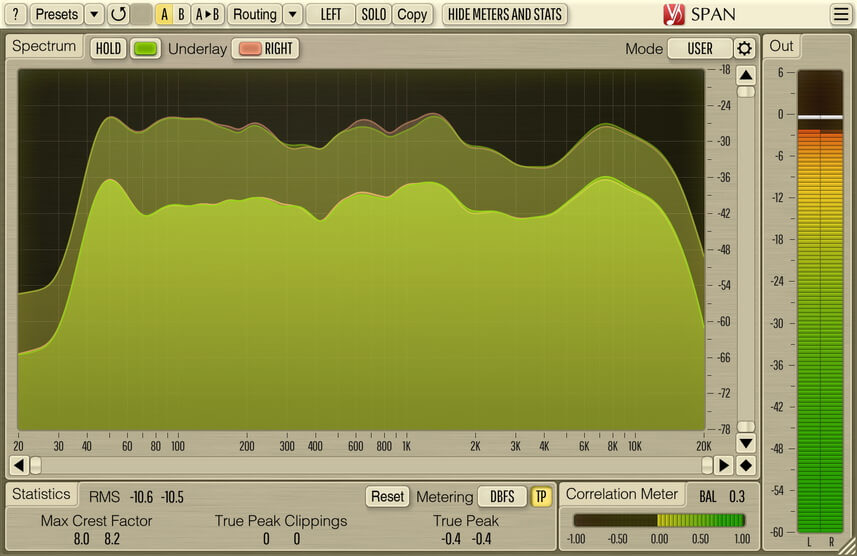
one of the most valuable things you can have running in a session.
What keeps me coming back is the combination of depth and usability. On the surface it is straightforward: load it up, see your spectrum. But dig a little deeper and you have adjustable FFT block sizes, slope compensation, smoothing controls, peak and RMS metering, K-system metering, stereo correlation and full mid/side analysis. You can run multi-channel analysis and compare two signals simultaneously using color-coded overlays, which is incredibly useful for spotting frequency clashes between bass and kick, for example.
The correlation meter is something I rely on regularly for checking mono compatibility. The mid/side mode helps diagnose stereo width issues quickly. And the frequency solo function, where you can sweep through the spectrum while listening to a narrow band in isolation, is a genuinely powerful way to track down problem frequencies fast.
It is not the prettiest plugin on the market. The interface is functional rather than flashy. But after more than ten years it remains one of the most accurate and configurable free analyzers available, and it runs efficiently even in large sessions. Your ears make the final call. But SPAN tells you the truth.
Verdict: A permanent fixture in any serious mixing setup. Free, reliable and precise after all these years.
Voxengo MSED – mid-side encoder and decoder
Voxengo keeps delivering with their free tools, and MSED is another one that earns a permanent spot in any serious setup. I use it regularly and genuinely enjoy working with it. The combination of simple handling, solid visual feedback and reliable results makes it one of those plugins you just keep coming back to.
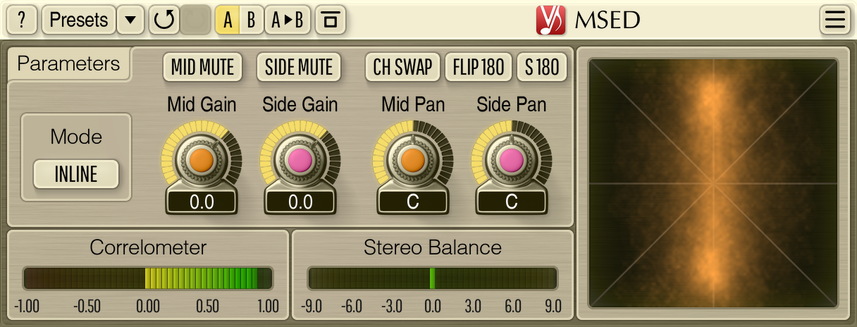
At its core, MSED is a mid-side encoder and decoder. It can split an incoming stereo signal into its mid and side components, process them independently, and decode everything back to stereo. But the inline mode is where most of the day-to-day work happens: adjust mid and side gain and panning within a single plugin instance, no need to chain two separate instances in sequence.
The controls are clean and logical. Mid gain and side gain let you shape stereo width directly: pull the sides down for a narrower image, push them up to open things out. Go too far and phase correlation suffers, which the built-in correlation meter and the unique plasma vector scope make immediately visible. That visual feedback is one of the things I appreciate most about this plugin. You always know exactly what is happening to your stereo image in real time. Mid pan and side pan add another layer of control that is surprisingly useful in practice. If a mix feels slightly off-center and simple left-right adjustments are not fixing it, panning the mid channel independently can bring things right into place without touching the sides.
Beyond stereo width, MSED handles 180-degree phase flipping for both mid and side channels, stereo channel swapping, and mid or side channel extraction. The encode and decode modes make it straightforward to use with dual-mono hardware or any plugin that does not natively support mid-side routing.
Compared to paid alternatives it holds up remarkably well. The panning options for mid and side independently are something many other tools simply do not offer, free or otherwise.
Verdict: A precise, versatile mid-side utility. Completely free, and better than many tools you would actually pay for. I use this all the time.
Visit my BLOG for other vst recommendations, production tips and more!
Cheers,
Oliver Schmitt aka Sounds of Revolution (SOR)