Review PunchBox2
Introductory words
PunchBox2 is a bass drum synthesizer that holds personal significance for me. To start, let me share a bit of its history with you.
In 2014, I developed a bass drum synthesizer concept with my partner, Martin, from CFA-Sound, with whom I also run Resonance-Sound – a resource for synth presets, samples, and more. Since the highly respected D16 Group from Poland is widely regarded as a benchmark for authentic digital emulations, and we had been working with their outstanding plugins for a long time, we presented our concept to them.
The chemistry was right from the start, and we quickly agreed to collaborate on creating this bass drum synthesizer. As you can imagine, countless brainstorming sessions, beta tests, and conversations took place before PunchBox was finally completed. Sometimes, the language barrier had its special moments – usually the kind that turned our German-Polish tech talk in English into pure entertainment.
We met in person for the first time with the release at the ‘Musikmesse Frankfurt’ (back when it was still around) here in Germany, where we also sat down with editors from various music magazines to introduce PunchBox to the music industry. Some of you might even remember the first PunchBox teaser we released back in 2016.
We had great conversations under a beautifully sunny sky and enjoyed a few beers with the guys from D16. It was a perfect day – one that changed a lot for me and my label, Sounds of Revolution.
Over the years, this has grown into a fantastic partnership, with more VST plugins on the horizon. Stay tuned for more details!
PunchBox V1 hits the Industry – May 2016 (Click to enlarge)
We’re thrilled and grateful that PunchBox remains so popular in the music industry, even after all these years without a feature update. It’s not just a staple in techno, house, and EDM – it’s also used by hip-hop and R&B producers.
In this review, I’ll dive deeper into what’s new, share some background details, and give you a few practical tips along the way. But as you can probably guess, it’s almost impossible to be fully objective – after all, I was deeply involved in this awesome project and will continue to shape its future with updates, enhancements, and expansions.
By the way, feel free to reach out anytime if you have ideas, requests or suggestions. We genuinely appreciate hearing from users, and your feedback plays a real role in shaping future updates and pushing PunchBox2 forward.
PUNCHBOX 2
Official Trailer
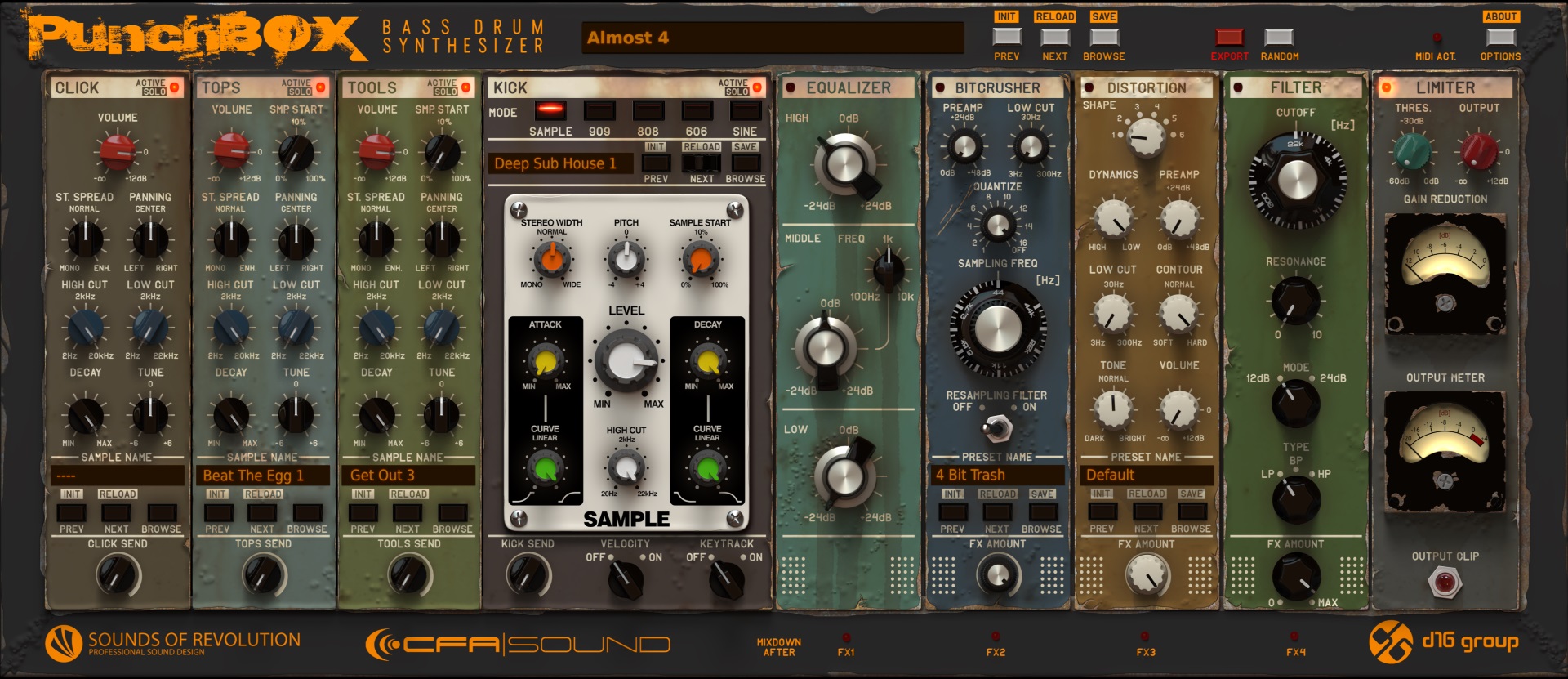
PunchBox 2 is a monophonic virtual instrument for designing kick drums. It builds each kick from layered sound sources, combining sampling and synthesis in a single, focused workflow. Three layers are dedicated sample players, while the fourth kick generator can operate either as a sample player or as a synthesizer with multiple synthesis engines.
It ships with a large, curated, and versatile factory library, so you can start producing right away. Sampling and synthesis work hand in hand to create powerful, polished, production-ready kicks that cut through modern mixes.
The scalable, hardware-inspired interface keeps everything on one screen, with no hidden menus and no parameter hunting. This long-awaited scalability means the GUI now renders perfectly crisp and properly sized on any monitor, at any resolution – no more squinting on 4K displays or oversized windows on smaller screens.
Load it, tweak it, done. No manual required.
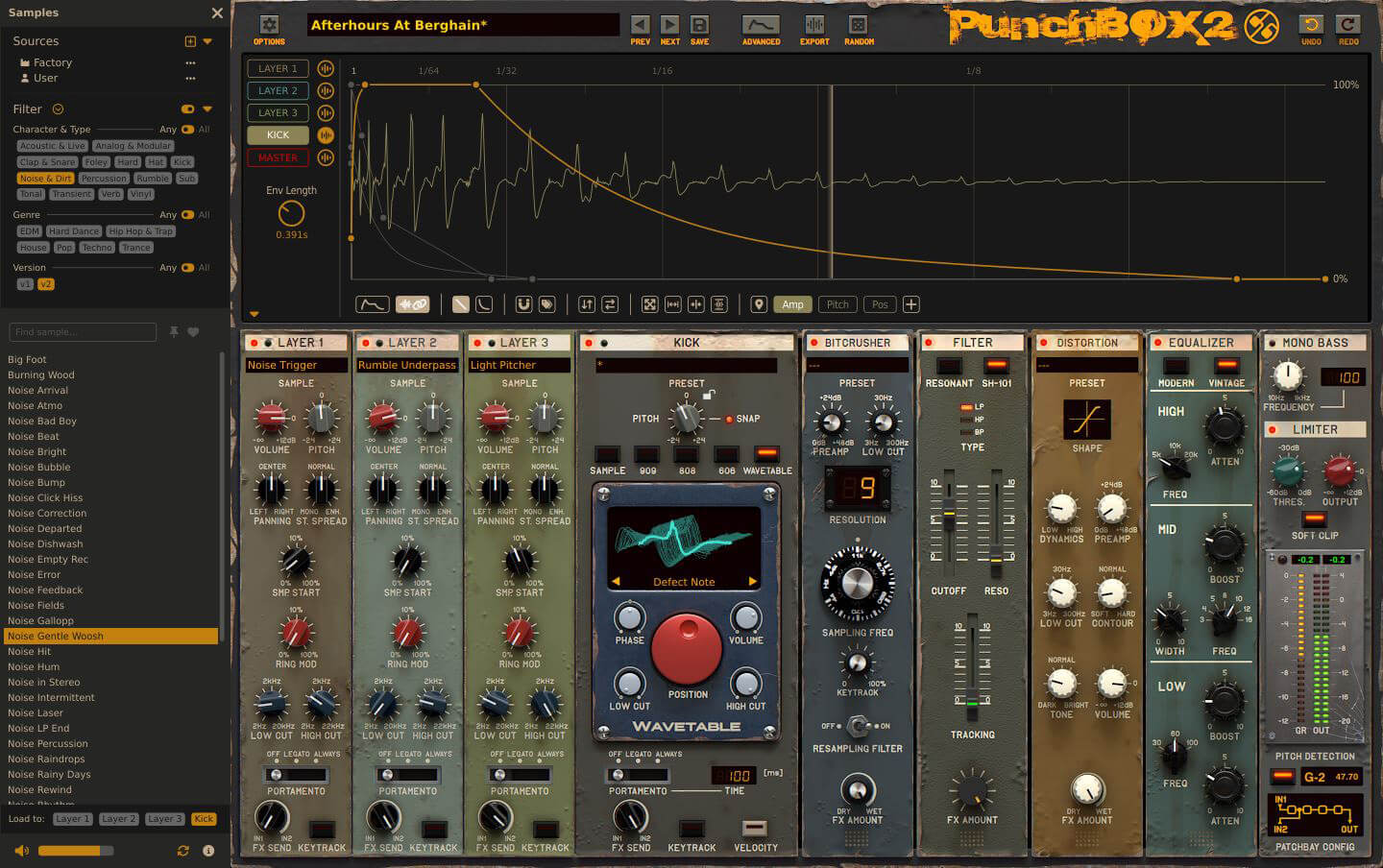
Advanced View incl. Sample Browser – 1 of 3 GUI layouts, fully scalable
Walkthrough & Feature Overview
In this walkthrough video, we recorded a session together to guide you through PunchBox 2 and give you a clear, hands-on overview of the new workflow and core features in version 2. Recorded in English. Delivered with German accents.
Preset Showcase
We produced a 22-minute demo that shows how PunchBox2 works across different musical styles.
Just hit play and let the range speak for itself – from soft kicks to energetic low-end. The new wavetable generator is one of the key additions and already shows how flexible PunchBox 2 has become. If you want to jump to a specific style, the YouTube chapters make it easy.
The Core Concept
Sound Generators
At the heart of PunchBox 2 are five sound generators, each playing a crucial role in shaping your final kick sound. Derived from D16’s highly regarded emulations of vintage Roland drum machines (TR909, TR808, and TR606), these units were fine-tuned and optimized specifically for PunchBox’s needs. There’s also a brand-new wavetable generator, designed for modern, hybrid kick design.
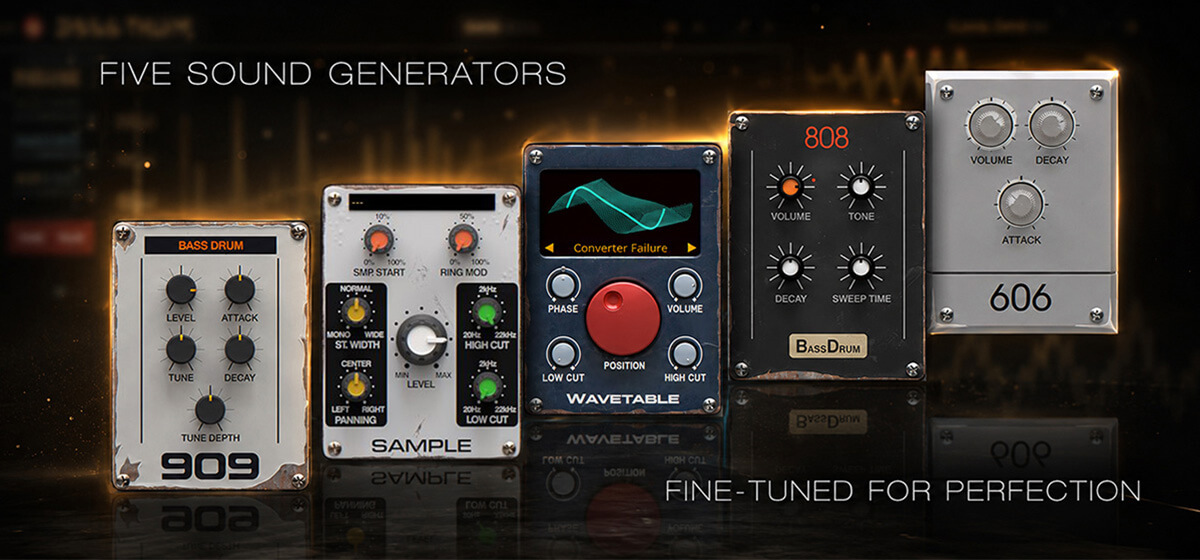
- 909 – a faithful recreation of the iconic TR-909 kick that defined techno and electronic music for decades with its distinctive analog punch.
- Sample – full access to the entire sample library, offering unlimited flexibility with both factory content and your own custom sounds.
- Wavetable – a completely new addition that introduces a modern, hybrid approach to kick design with endless sonic possibilities.
- 808 – an authentic emulation of the legendary TR-808, delivering deep, booming low-end and timeless analog character.
- 606 – modeled after the TR-606, featuring a short, punchy attack that perfectly fits tight, precise electronic grooves.
Sample Layers 1-3
On the left, three layers add extra elements to the kick drums. The included samples range from boomy to tight, airy to wooden, and slamming to round. All three layers offer the same controls for volume, sample start, stereo spread, panning, high- and low-pass filters, pitch, and the new ring modulation. You can control how much of each layer is sent to the FX section
When creating kicks, I find the Sample Start (SMP Start) parameter to be a powerful, easy-to-use tool, as it specifies the sample’s starting point (offset) from which it is played. This function allows you to modify the transient response very efficiently. Or you can, for example, specifically select the analog noise of the tail of a kick sample (additionally with a low/high cut filter) and then mix it into a previously too clean-sounding 808 kick. With Sample Start, you can precisely select the part of the sample that you want to use for further processing of the target sound. I use this function all the time.
New in V2: each sample layer now has unrestricted access to the entire internal library, or your own samples. Thanks to the intuitive graphic MSEG in V2, the three cells no longer include the V1 parameters. Instead, Keytrack (a switch that controls whether a sample reacts to the incoming MIDI notes’ pitch) and Ringmodulator, which is great for sound design, have been added.
Keytrack Tip:
This function is typically used for tonal playback, making it ideal for long, boomy, characterful sounds from the PunchBox 2 library. When combined with Portamento and the 808 or new Wavetable Generator, it also enables incredibly realistic and playable basses – perfect for deep, pumping, melodic basslines.
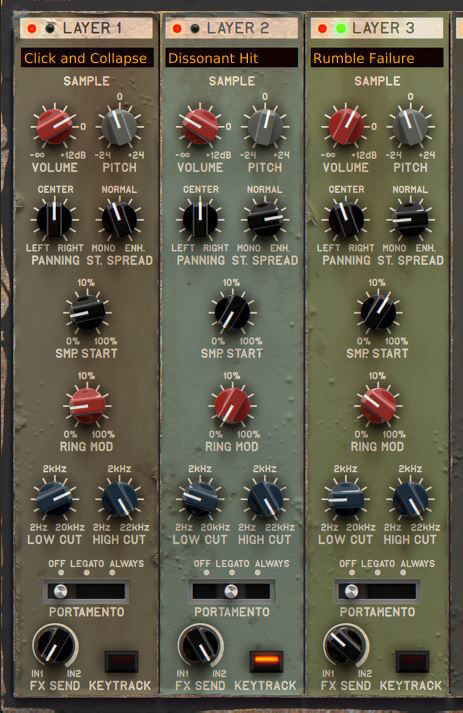
However, you can also use Keytrack to create organic-sounding kicks, basses, and percussion specifically. To achieve this, deliberately mix a noise or foley sample (simply use our Tag “Noise & Vinyl”) with the main kick drum and activate Keytrack only in that specific “noise sample layer”. Tonal differences in noise are usually quite subtle, yet by using Keytrack, you can create very organic-sounding sounds simply by playing different keys. The sample should therefore not have a clear tonal character, otherwise playing it on the keyboard will sound too much like it’s been transposed, which is not what we want in this case.
This way, you can easily avoid kicks that sound too static and add a more natural feel to your sound, which works especially well for hip hop, R’n’B, ambient music, or any production that benefits from a more organic character. The V2 presets ‘Digitized’ and ‘Hollow Hit’ illustrate this, for example.
Effect Rack
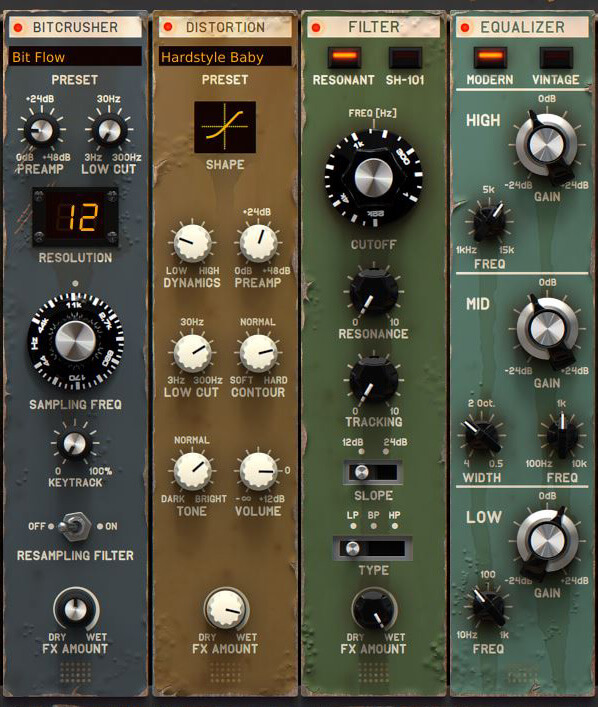
The plugin’s right side hosts an effect rack for sculpting your kicks, beefing them up however you like.
Bitcrusher
Featuring a Resampling Filter for smooth post-processing, it combines bit crushing with sample rate reduction (down to 44Hz). Max out the bit rate with a boosted preamp for analog-style distortion. Since D16 Decimort is, in my opinion, the market’s best bitcrusher, it speaks for itself, with sub-presets included to get you started.
With our extra envelopes, also available for the Bitcrusher, dive into creative sound design: automate a short click at the kick’s start via bitcrusher quantization (16-bit to low) for a musical, fitting noise transient that blends seamlessly, with no layered-transient feel. The Presets ‘Modular Response’ and ‘The Bad Boy’ show the additional envelopes.
The Bitcrusher also handles subtle processing well. Gentle settings add bite, presence, and character without obvious lo-fi artifacts, helping a kick cut through a dense mix while keeping its punch and low-end impact.
It’s a versatile tool that earns its place in the chain whether you’re after extreme destruction or just a touch of analog grit.
Distortion
The Distortion effect enhances the signal with added harmonics and a richer, more defined character. It has 6 different distortion types with fairly self-explanatory settings. It includes Contour, Tone, and pre-saturation compression controls. A low-cut is also included so that the kick’s low end is saved if necessary. Most of the parameters of the distortion unit can also be controlled via envelopes, which massively expands the possibilities for shaping the perfect kick sound. Anyone familiar with D16 Devastor will immediately recognize the sonic quality of this distortion module. Also, here, we added some sub-presets to get you started.
2 Filters
The multimode (LP/HP/BP) resonant filter of PunchBox1 has slope options of 12dB and 24dB/octave. In PunchBox 2, we added the wonderful-sounding SH101 Filter that emulates the circuitry of the classic Japanese SH-101 synthesizer. Both modes offer a similar set of parameters, yet they sound noticeably different because of their unique tonal characteristics.
2 Equalizers
PunchBox 1 already had a three-band equalizer with a sweepable Mid-range band (100 Hz – 10 kHz), flanked by high-frequency (5 kHz) and low-frequency ranges (100 Hz). In PunchBox 2, a new Pultec-style EQ was added.
You can find more details about the new Filter and EQ in the Highlights section below.












The effects are fully rearrangeable by simply dragging them, giving you endless possibilities to shape your kicks – from subtle tweaks to dramatic transformations. When you drop one effect onto another, their positions in the rack are automatically swapped, updating the signal flow accordingly. Pair this with the new Patchbay Configuration (10 different signal routings) at the bottom right, and you’ll be amazed at the new sonic results you can achieve with just a few clicks. I highly recommend just clicking through the Bitcrusher and Distortion presets – it’s a great way to get inspired and see where your sound can go.
Mono Bass
Right before the limiter, there’s now a mono circuit with adjustable frequency, allowing you to define exactly where the kick becomes fully mono, for example, below 120 Hz.
Keeping the low-end mono is essential for tight, focused, and powerful mixes that translate well on any sound system. The Frequency knob sets the crossover point, meaning everything below it is summed to mono, while higher frequencies remain stereo and retain width and space. This helps your kick stay centered and punchy, while the upper harmonics can still breathe and add depth to the mix.
Limiter
The optionally enabled limiter with integrated auto-makeup forms the final processing block in the chain. It keeps the kick under control while at the same time allowing it to sound bigger, denser, and more aggressive when pushed. Since this limiter is extremely powerful and can completely reshape the tone, I highly recommend experimenting with bold settings rather than playing it safe. You’ll be surprised how it can emphasize tiny details, add punch, or even introduce pleasing saturation.
It’s not just a protective tool but also a creative sound-design element that can transform an average kick into something truly massive and unique.
In many cases, a few dB of gain reduction are enough to add extra energy and cohesion, helping the kick sit more confidently in the mix while maintaining a solid and controlled low end.
Soft Clipper
The Soft Clip is an additional safety and tone-shaping stage placed right after the limiter. Since the limiter isn’t a strict brickwall design, occasional peaks may still occur, and the Soft Clip ensures they never exceed 0 dB. It gently rounds off transients instead of cutting them harshly, keeping the signal smooth and musical.
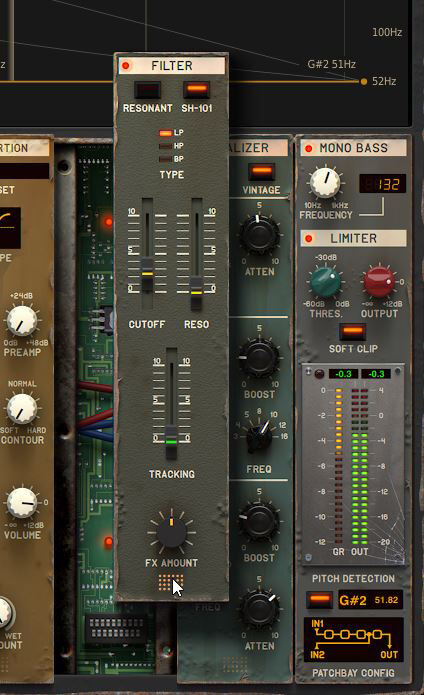
fully rearrangeable effects
You can also use it creatively. Push the output level and enable Soft Clip to add character, grit, and edge to your sound. It’s perfect for adding analog-style saturation and extra punch without ever clipping in your DAW.
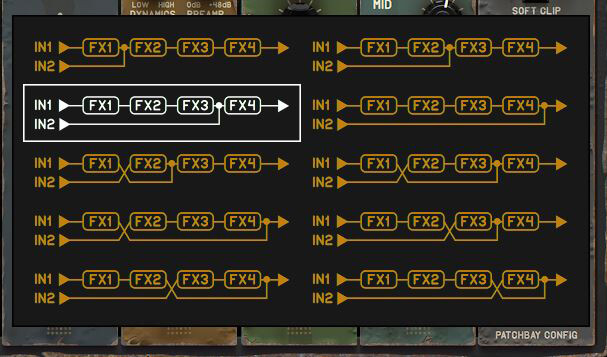
Patchbay configuration
The patchbay configuration lets you choose between 10 different connection topologies for the effect rack, going beyond a simple serial chain. This makes it easy to experiment with more complex routings and different signal flows between the effects.
You can click the field in the bottom right corner to open the full overview, or simply hover over it and switch configurations with the mouse wheel for quick changes while working.
Changing the routing on the fly is genuinely fun and often leads to interesting results you would not have expected when working with a fixed signal chain, opening up new creative possibilities along the way.
Library and presets
Under my label Sounds of Revolution, I have created thousands of drum and one-shot samples over the last 20 years, of which only the best, plus countless brand-new samples, have been included in PunchBox 2. Of course, my buddy Martin added tons of cool sounds too – turning PunchBox 2 into a real goldmine for crafting your own kicks.
These are partly full kicks from (classic) drum machines, click samples, unique elements from modular systems, and special layering and shaping samples such as special noise floors, vinyl crackles, unusual field recordings, etc, to give kicks the perfect shape. For the content of PunchBox 2, we used simply the best tools and high-end (analog) gear we could get. Consistent character and sonic identity were always a priority, and PunchBox 2 reflects that across the entire library.
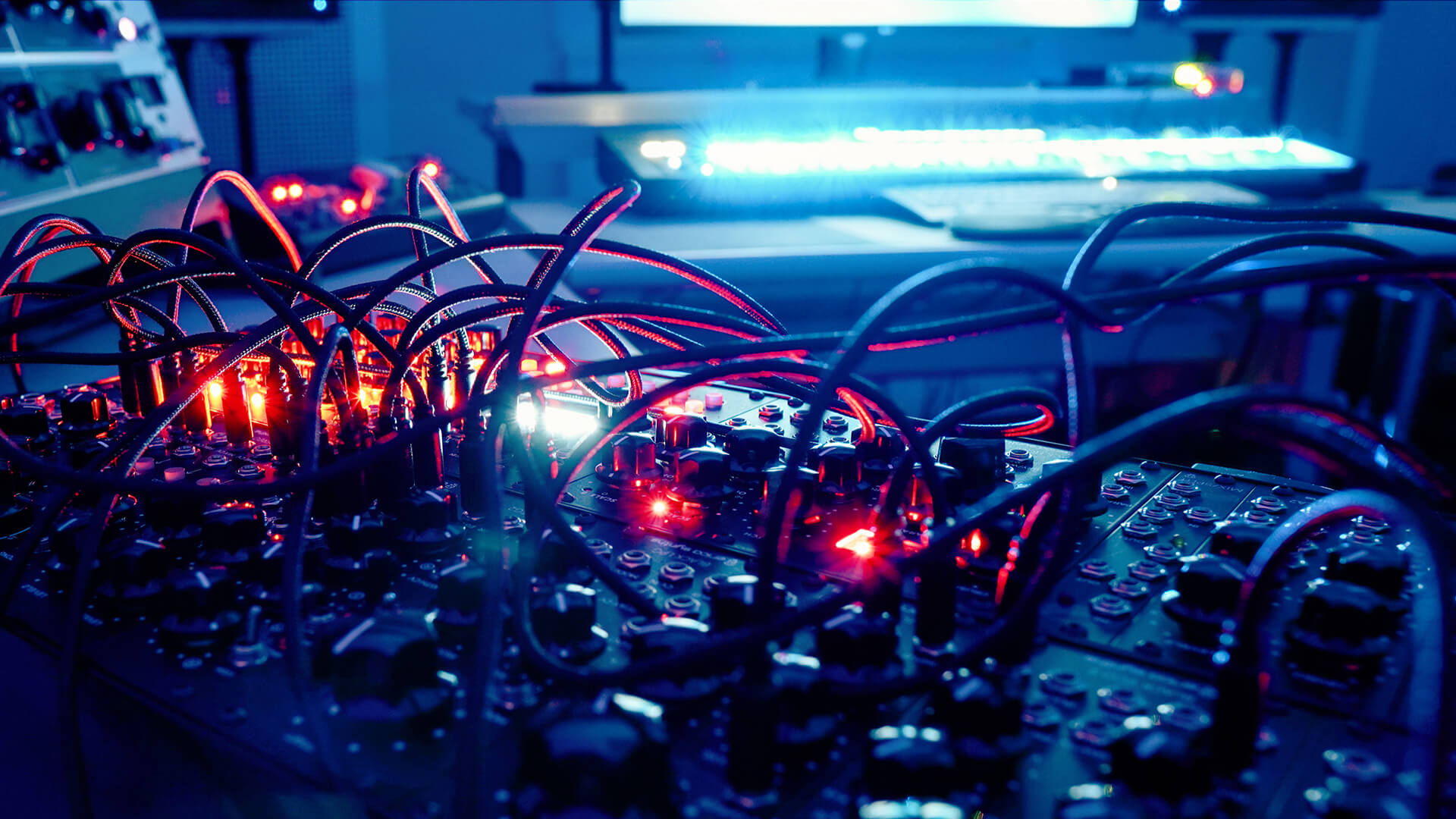
Erica Synths Black System III – one of the modular systems used during the sound design process in the SOR Studio.
The original PunchBox library already included a massive set of 1100 samples and 800 presets covering nearly every modern subgenre of electronic music. With PunchBox 2, we’ve taken this foundation and expanded it significantly, pushing the entire library far beyond its original scope. The result is a much richer collection with a large amount of new material, including fresh samples, brand-new wavetables, and an entirely new set of factory Master presets that fully take advantage of the updated architecture.
The new wavetable engine delivers beautifully organic basses, complemented by freshly recorded acoustic and live samples for a more natural touch. Hip Hop and R&B producers will feel right at home here as well, especially now that Keytrack is available in all sample cells.
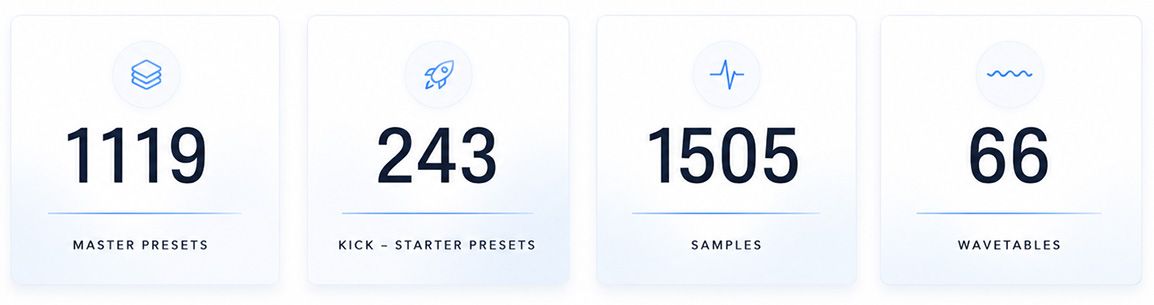
The new browser lets you filter and display only the latest PunchBox 2 content with a single click, making it easy to explore what’s new.
Every Master Preset from the original library has been carefully re-balanced and optimized for the updated engines, effects, and gain structure. The result is a massive collection that feels familiar yet sounds tighter, cleaner, and more powerful than ever.
I’m really proud to say that PunchBox 2 now features one of the largest libraries of its kind currently available. And this is just the beginning. Artist expansions are already in production.
Individual Stereo Outputs / Trim
In addition, PunchBox 2 now has 5 individual stereo outputs (Master Out, 3 Outs for Layer 1-3, and Kick Out).
It can be interesting to process a certain part of the kick with external tools, for example, if you want to add a light reverb or delay to the click, or if you want to use your own kick processing chain. There are no limits to sound design here, even if you use “non-kick-related material”.
Since every producer has a different workflow, we’ve added a master output trim on the back panel, with selectable levels of 0 dB, −3 dB, or −6 dB to suit different production approaches.
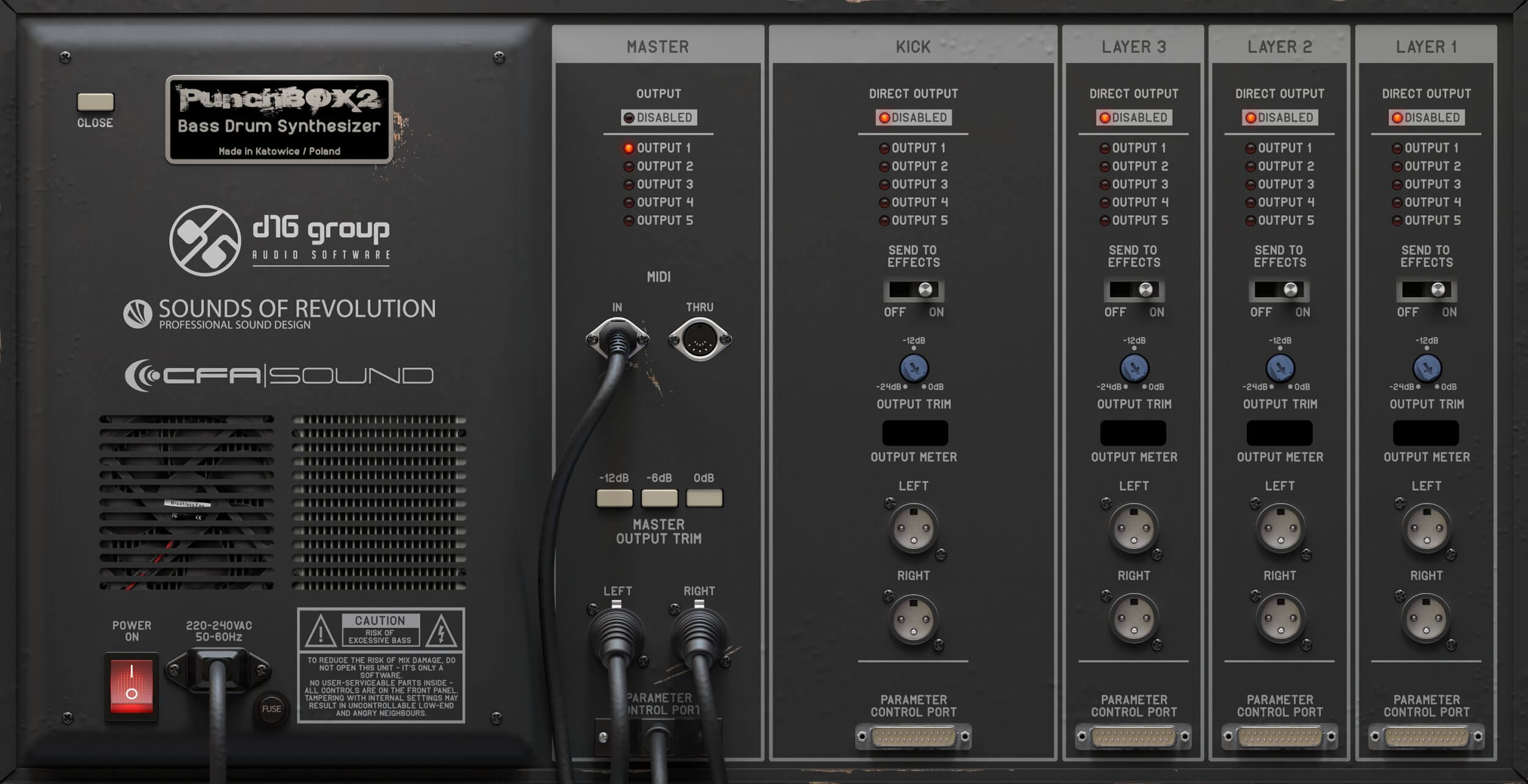
Additional settings can be adjusted via the back panel (Click to enlarge)
Export Function
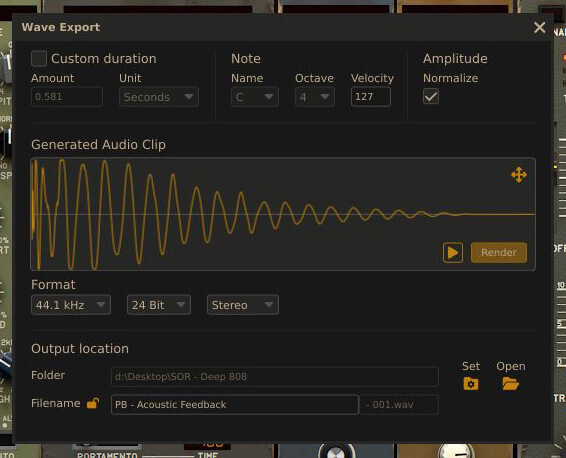
Additionally, a new, easy-to-use Export function lets you render your finished sounds as WAV files, then drag and drop them into your DAW and continue producing without keeping the plugin running, useful for saving CPU and building your own library of custom designs. The export window also gives you control over duration, note, octave, velocity, and amplitude normalization, so every rendered sample comes out exactly the way you need it.
Activating “Keytrack” lets the bass drums follow the pitch of programmed MIDI notes, turning PunchBox 2 into e.g. a playable 808 generator, making it easy to create tuned bass drums that sit musically and stay consistent across notes, and the exported WAVs can be reused in any project or sampler. Also worth mentioning are the organic basses the wavetable cell can produce, adding even more variety to your exported sounds.
Producers of R&B and hip hop especially will find value here, as the export workflow fits perfectly into sample-based, melody-driven production styles.
Highlights of PunchBOX 2
PunchBox 2 has received great new features in many areas that make working much easier. I would like to go into the highlights below.
Graphical Envelopes
One of PunchBox 2’s biggest highlights is the new graphical Multi-Stage Envelope Generator (MSEG), shown at the top of the interface when activated. It can be displayed in three different layouts – Standard, Advanced, and Expanded – depending on how much space and precision you need.
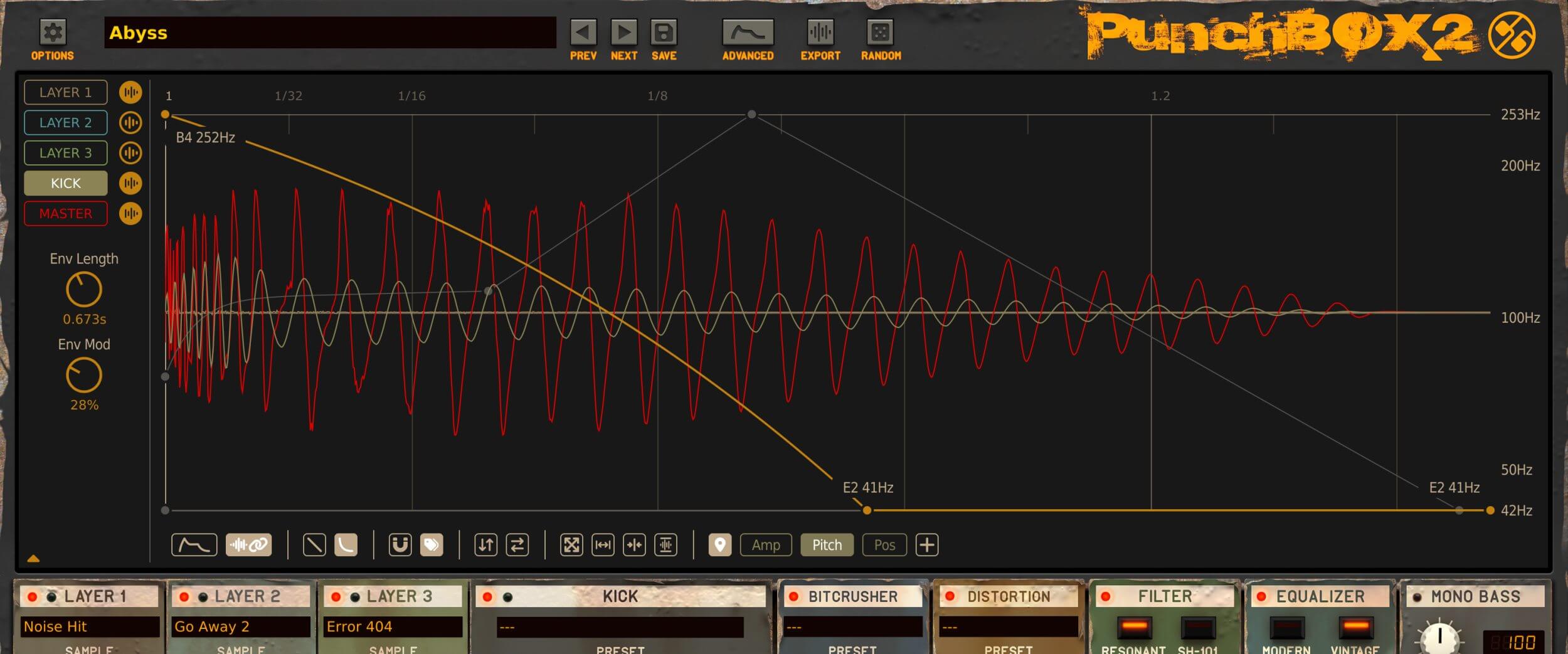
Advanced Editor (Click to enlarge)
The compact standard view (comparable to PunchBox1) already covers most tasks. However, for those who want to delve deeper into editing, we also offer an Advanced View and an even larger Expanded View. Both include real-time waveform previews for individual layers and the master output. While the “normal” Advanced View certainly offers sufficient editing space for most users, the Expanded View is significantly larger, allowing for very detailed work. With PunchBox2, users have a great deal of freedom to choose their preferred workflow.
With PunchBox 2, you can now graphically edit the amplitude and pitch envelopes of the Kick cell, and you can also modulate the wavetable position, which opens up entirely new sound design options and offers a higher level of control compared to the first version.
Each envelope supports adjustable length, modulation amount, and two time-scaling modes: Linear (1:1 timing across the X-axis) and Logarithmic (for ultra-precise shaping at the start of the envelope).
The MSEG workflow is also supported by 16 quick envelope presets, tagging, horizontal and vertical flipping, a locate function, and more. Especially the Flip functions speed things up – one click, instant mirror, instant idea.
Some parameters, such as Distortion, Bit Crusher, Ringmod, and the Low/High-Cut filters in the sample cells also support dedicated envelopes, enabling highly detailed modulation. For example, you can distort only the tail of your kick or add subtle movement over time. Small detail, huge sound design potential, and not just for kicks.
There’s even more going on under the hood – the manual covers all details.
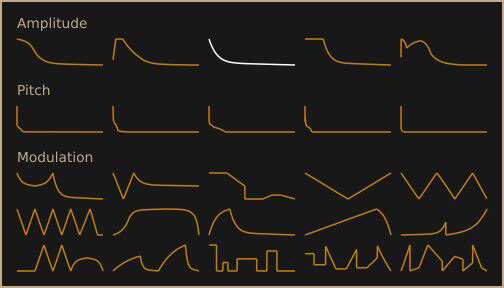
Quick Envelopes – real time-savers
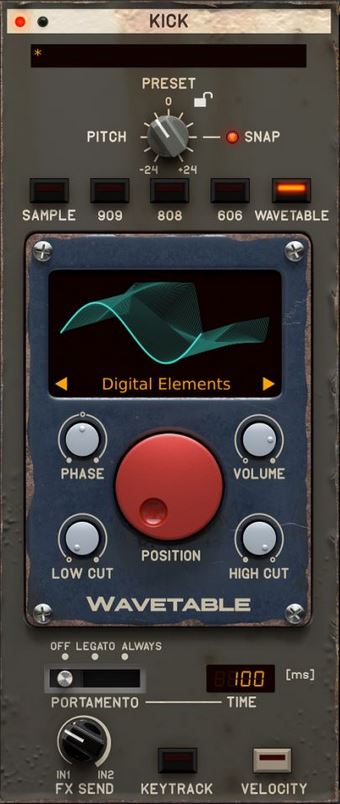
Kick Generator – Wavetable
The new Wavetable Generator is one of the biggest sonic upgrades in PunchBox 2 and extends kick drum synthesis beyond classic sine sources. PunchBox 2 includes 66 custom-designed wavetables, created from high-end analog synths recorded through clean analog chains and refined with high-quality plugins. The focus is on a stable low end with enough harmonics to cut through a mix without breaking the sub.
The engine offers focused controls: Position, Phase, Volume, Low Cut, and High Cut. Position can be modulated in real time, adding subtle spectral movement within a single kick. Phase adjustment from -180° to +180° helps when layering generators to avoid phase issues. Low Cut and High Cut let you shape the frequency range of the wavetable layer before it reaches further processing.
The display can be switched between 2D and 3D views, the wavetable name opens the browser, and the arrow icons let you step through all available tables quickly. The Kick Cell also includes a Velocity button, allowing dynamic playing of sounds. When enabled, all generators respond to the velocity values of incoming MIDI notes. This is especially useful for Hip Hop styles, where more organic, human-feeling kick patterns benefit from velocity-based variation.
Signal routing to the FX chains is flexible. Using the FX Send parameter, you can blend how much of each generator is sent to FX Input 1 and FX Input 2. The FX Send works like a crossfader between both FX chains for each generator. Portamento is included and ideal for playable 808-style kicks or bass sounds.
Another advantage of the wavetable approach is the ability to create kicks that feel more alive without relying on additional layers. Different wavetables can introduce subtle tonal shifts, extra punch, or unique low-frequency textures while keeping the overall sound focused and controlled. Combined with modulation and filtering, the generator becomes a surprisingly versatile sound design tool that can cover everything from clean electronic kicks to more aggressive and characterful drum sounds.
What starts as a simple sine can evolve into something rich and expressive, even adding harmonic motion before a drop. Unlike typical distortion or saturation, these wavetables preserve low-end integrity. You can push them hard without losing the weight and pressure that make a kick truly hit.
Why we replaced the Sine cell with the Wavetable cell
I used the Sine cell in Punchbox 1 a lot myself – but the new Wavetable cell in Punchbox 2 is clearly the better choice, and you don’t lose anything in the process.
The very first wavetable is called “A Tasty Sine”: leave the position knob alone, and it sounds exactly like the old Sine cell. Turn it, and you get extra saturation plus – through envelope modulation in the Advanced Editor – entirely new sonic movement. So the core sound is still there, but it goes far beyond it, opening up practically endless additional facets.
We replaced it rather than keeping it alongside the Wavetable cell because the Wavetable cell can do everything the Sine cell could – only with more precision, more flexibility, and more envelope points. Maintaining two parallel systems wouldn’t have brought any real benefit. On top of that, the old Sine cell would have limited the Advanced Editor, since it can’t really interact cleanly with the amp and pitch envelope.
If you still miss the old sound, Kick Starter Presets (select Tag ‘Wavetable’ here) or simple Quick Envelopes let you use the Wavetable cell just as easily as before – the extra depth is an option, not a requirement.
Separate Browsers for Master & Kick Presets, Samples & FX
Since V1, you’ve been able to use “Next”, “Previous”, and “Browse” to step through samples and presets quickly and conveniently. Users have been telling us for years that this feature makes working with PunchBox much easier.
With V2, however, we’ve introduced several integrated new preset browsers that are super easy to use. They open in compact pop-up windows that take up only minimal space on the interface. Depending on the preset type, the window can display sections such as Resources, Filters, an Information Pane, and a Preset List. Each preset type is stored as separate content, divided into User and Factory.
On the left-hand side, you’ll find the sample browser. Here you can access specific storage locations (similar to what you know from Ableton), set favorites, apply tags, and much more. An additional Kick Browser (which opens next to the Kick Generator) lets you choose from 243 starter presets for the kick engines (909, 808, 606, and Wavetable) and continue editing them right away – a perfect starting point to create your own unique kicks quickly and intuitively. We’ve also added a dedicated browser for the countless Master Presets, which, despite its sheer size, is very easy to navigate. And last but not least, both the Bitcrusher and Distortion modules come with their own useful starter presets.
The real fun begins when you start importing your own samples – now with simple drag-and-drop. This open architecture gives you complete freedom to organize and shape your sounds exactly the way you want.
Under the hood, smart search functions are at work. Even if a sample of your harddrive has been renamed and can no longer be found in the master preset, a checksum comparison makes it possible to locate it again with a single click.
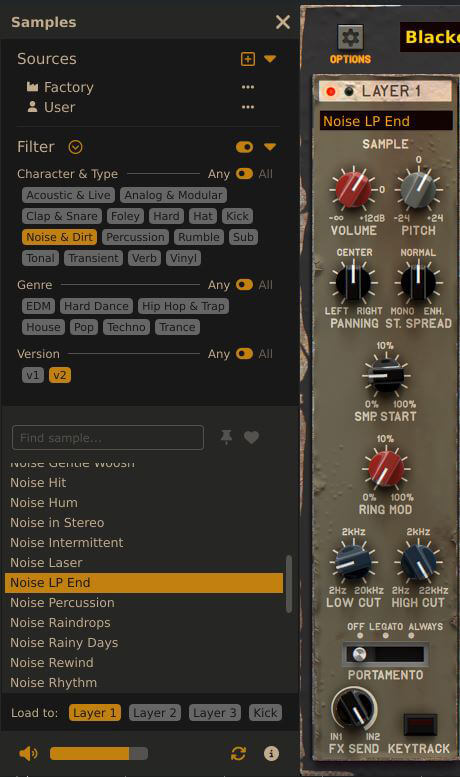
Sample Browser – 1500+ included samples
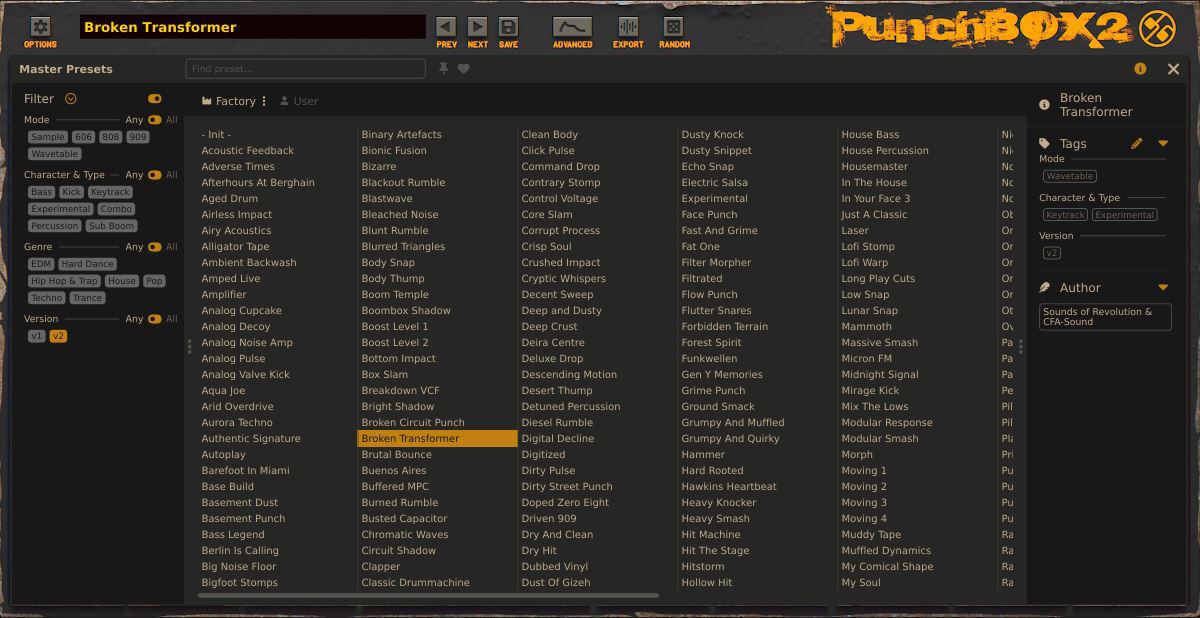
Master preset browser with 1100+ presets and intuitive selection options
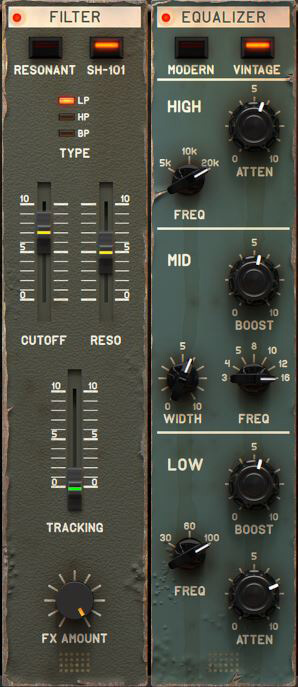
2nd Filter
In PunchBox 2, we added the SH-101 Filter, the same wonderfully musical filter you know from D16 Lush-2. Besides boosting frequencies with the Resonance control, it’s also great for taming harsh top-end content, for example, from the Bit Crusher. You can easily create smooth filter automations to fade in a kick gradually or to give transitions more movement and tension.
The filter sounds warm, creamy, and full of character – exactly what you’d expect from a true analog-inspired design. Whether used subtly to round off the sound or pushed for resonance sweeps, it always feels responsive and musical. I really love this new filter – it adds that last bit of analog flavor and control that was missing in V1.
2nd Equalizer
PunchBox 2 also introduces a Pultec-style EQ, based on the same circuit as the D16 Pulsatec EQ. It allows you to boost and cut the same frequency band at once – the legendary Pultec trick – creating a subtle resonance and a beautifully tight, punchy low end. Perfect for kick drums and basses.
Try the 30 Hz band on your kick with +5 dB Boost and Attenuation at the same time. The curve gives you a tighter, more controlled low end with more weight but less boominess, as shown in the image below. The highs also open up nicely, adding clarity and bite.
With its clearly defined frequency bands and simple Boost/Attenuation controls, this EQ is fast and intuitive to use. It adds fullness, warmth, and that classy analog sheen.
When building the new factory presets, I used it constantly – simply because it sounds better.
Global Pitch incl. Lock Function
With PunchBox 2, you get a global pitch control for all kick engines – 606, 808, 909 and Wavetable. Just set the key of your track once, lock it, and get straight to designing. No more guessing if your kick is in tune – it simply is.
Open the Kick Sub-Browser, pick any sound you like, and it’ll instantly play in the right pitch. From there, tweak Layers 1-3, add FX, and shape it your way. Want to explore freely? Just disable the lock and scroll through sub-presets without fixed tuning. Fast, intuitive, and made for flow.
The Padlock function keeps any parameter frozen when switching Master or Kick presets – perfect if you’re hunting for that one kick that stays locked to your song’s root note. The Pitch knob itself offers a handy snap function, letting you jump directly to specific semitones for pinpoint tuning.
Pro tip: set your Pitch knob sound to C, and enable Keytrack. This way you can turn any kick preset into a playable note/bass.
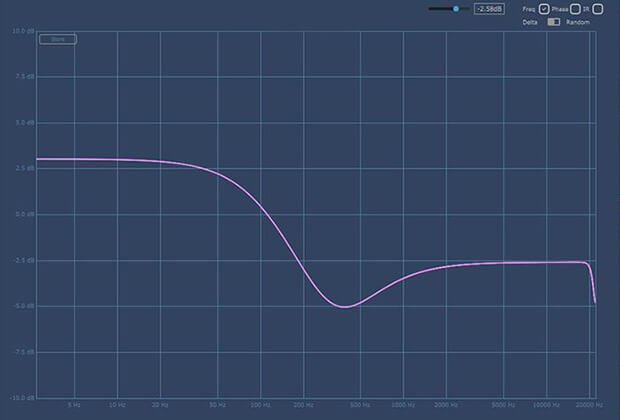
Vintage EQ: here each with a +5db Boost and Atten at 30Hz band
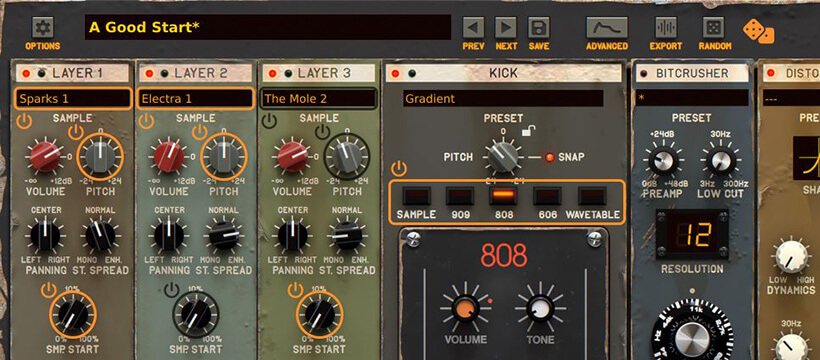
Randomization
If you’re not in a creative mood, simply browse the tagged presets or use the Random Sound Generator. We’ve taken this feature from PunchBox 1 even further – with one click, you’ll get fresh, often surprising kick ideas.
Activate Randomization Mode by clicking the Random button in the top panel. The interface changes slightly, and all randomizable parameters are highlighted in orange.
Next to the Random button, the Dice icon shuffles the selected parameters, while the
Standby icon beside each control lets you include or exclude it from randomization. When randomizing samples in Layers 1–3 or the Kick cell, only sounds visible in the Sample Browser (based on your active filters) are used. Once you’ve set what to randomize, hit the Dice icon to explore new combinations. Smart value ranges ensure musical results, so you just choose what’s affected. When you’re happy, click Random again to exit Randomization Mode and fine-tune your kick.
Tip: If you’ve tagged Kicks in Layers 1–3, use a low-cut filter in those layers to avoid overlapping sub-bass frequencies with the main kick.
Ringmodulator
Furthermore, a Ringmodulator is now available in the sample cells, which can quickly transport any sound to new spheres. It’s a fantastic tool for sound design and also perfect for creating percussive elements. You can also use it to turn a normal full kick into a wonderful modular-sounding tom/percussion sound. Try it out, you will be amazed.
What is also very interesting is that, in conjunction with the sample start control, you can quickly create a kick with additional offbeat bass from a normal kick. If you then use the new envelopes (e.g., distortion faded into the bass), just your imagination is the limit.
Sometimes I only subtly adjust the ring modulator to quickly introduce some volume modulation into the envelope of the layer samples. This is another way to selectively blend sounds. Used selectively, this has a great effect.
Automatic Pitch Detection
Producers will appreciate the new automatic key detection feature. It lets you instantly match your kick’s pitch to the key of your track. Of course, some kicks can’t be analyzed 100% precisely – for example, those with heavy noise content or complex layering – but overall, the detection works impressively well.
It also makes it easy to tune the sample cells to your kick by using the solo function of each cell.
A small detail, but a real time-saver and workflow boost in everyday production.
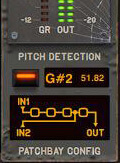
Some additional tweaks and quality-of-life improvements

10 Practical Tips & Tricks
1. Wavetable Magic
Automate the Wavetable Position in your DAW to create expressive, evolving kicks – especially during build-ups (the last 4–8 hits before a drop). You won’t get this kind of movement from a standard effects chain or any other Kick VSTi.
2. Envelopes = Sound Design Playground
Experiment with the new parameter envelopes (Distortion, Bit Crusher, Ringmod, Low/High-Cut). Use the starter presets, or create your own and flip them with H-Flip or V-Flip for instant variations and unexpected results.
3. Smart Pitch Tuning
Apply pitch detection not just on the master, but individually for generator and sample layers. This creates tighter, more homogeneous sounds – and can lead you far beyond kicks.
4. Randomize & Discover
Stuck for ideas? Use the new, improved Random Sound Generator. It’s quick, fun, and often produces surprisingly good results. Use it as a starting point and then further shape your desired kick.
5. Build Signature Kicks Fast
Load a Kick Generator Basic preset, then quickly browse through the sample layers Use tags to quickly find results that match your preferences. You’ll be amazed how fast you can get professional results. Tip: push the Limiter harder – it’s a secret weapon at extreme settings.
6. Bring Your Own Samples
Even though PB2 includes a massive library, importing your own samples keeps your sound unique and personal. It also lets you use transients or low-end you already know translate well in your mixes, so you can dial in the exact punch or weight your track needs.
7. Automate Everything
The more you automate pitch, decays, and effects, the more musical PB2 becomes. Don’t forget: envelopes for Distortion, Bit Crusher, and Ringmod can completely transform a sound.
8. Clip It Right
Raise the Output level until it clips, then enable the Soft Clipper. It keeps levels under control, adds character, and rounds off the signal nicely. You can push it surprisingly far before it gets harsh, which makes it great for extra loudness without losing punch.
9. Organic Kicks
You can get very organic kicks by enabling Velocity and using the Dynamics function of the Distortion module at the same time. Small variations in playing intensity subtly change the distortion behaviour and keep the kick alive. Adding a light Layer cell can enhance this effect, and activating Keytrack inside that Layer adds an extra touch of natural movement. Several hip hop presets show this in practice.
10. Keytrack on Noise Samples
Activating Keytrack on a noise or foley layer introduces slight pitch shifts that stop repeated hits from collapsing into one static sound. The effect is minimal, but in static kick and bass presets it adds the small movement that makes a difference. It interacts cleanly with velocity changes and pairs well with Tip 9, since both methods aim at controlled variation rather than obvious modulation. For the full explanation, see the Sample Layers section above.
My final thoughts
Since the first version of PunchBox, our primary goal was to develop a VSTi that is easy and intuitive to use, yet delivers high-end kicks without compromise. Although the sonic possibilities of PunchBox2 go far beyond the original version, its operation has become even easier thanks to many detailed workflow improvements.
Next to the authentically implemented Roland emulations D16 is best known for, the scalable GUI (3 layouts), grapical MSEG, dedicated envelopes, enabling highly detailed modulation, flexible Wavetable generator, various integrated browsers, 250 new plus reworked PB1 presets, SH-101 Filter, ‘Pultec Style’ EQ, and automatic key detection are highlights.
I also like the look of the GUI. It’s robust and full of character, with a hardware-like feel – never too digital or analytical.
PunchBox 2 is much more than a kick drum machine. Producers will appreciate the unique wavetable-driven kicks that go way beyond a simple sine wave and cut through any mix with ease. On top of that, the brand-new, punchy wavetable basses and percussion sounds are sure to impress.
This little beast is simply fun and delivers serious results in no time. Give it a shot – I’m sure you will be thrilled!
AWARDS

A FEW REVIEWS AROUND THE WORLD BY PRESS AND ARTISTS
 Music Tech Magazine UK
…with its enormous sample library, intuitive but extensive parameters and effects, and 800 tagged presets, it’s a bass drum design powerhouse, and hours are easily lost blending and tweaking the four layers in the quest for the perfect kick. Verdict: There’s quite possibly no conceivable kick drum sound for electronic music that PunchBox couldn’t create!
 Beat Magazine Germany
Whether you want to use the production-ready presets or program the bass drum of your dreams: With its powerful and variable sound, PunchBOX is equipped for all types of electronic music. The high-quality sample content also gives the classic sounds of the Roland drum machines a modern touch. The diverse and expressive sound generation, the musical effects and the intuitive operation ensure a high fun factor when creating your own kicks.
Rating: 6/6 + Editor’s recommendation!
 Computer Music Magazine UK
Coming from the developers of the Nepheton and Drumazon TR-808/909 emulations, it’s no surprise that the four synths of PunchBox’s Kick module sound fantastic. […] There’s quite possibly no conceivable kick drum sound for electronic music that PunchBox couldn’t create!
Rating: 9/10 + Performance Award!
 Chris Liebing
This PunchBOX plugin basically generates any kind of kick drum. You can do anything with it. It’s literally the most versatile kick drum-making tool on the planet.
 Dannic
I love what the D16 did with their plugins. Easy to use, raw sounding and it gives me endless possibilities to modulate my sounds to where they are unique.
 Pig & Dan
Punchbox is hands down the most versatile goto plug in for creating unique juicy kick drums. The flexibility of parameters enables quick and effective creativity without stumping your flow. These days the Kick is the root of all music and has become possibly the most prominent groove setter in all realms of genre. Punchbox brings all the juicy warmth with buckets of grit however without losing the punch it’s title suggests.
 Prok & Fitch
Loving this vsti! There’s so much scope to be experimental and really get your kicks sounding unique. There’s very little need for external processing as everything you have on the front panel sounds ace, especially liking the distortion to give that old school crunch and the option to add a little extra snap to the front of your kick is a cool feature. The built in drum machines to either layer your kick or build a new one are a great touch, so pretty much every base is covered. We’ll be using this a lot!
 Richard Devine
D16’s PunchBox, is one of the best kick drum synthesis instruments I have come across. The combination of built in synthesis and vast factory samples, allow you to make almost any kick drum imaginable, absolutely incredible!
 Jason Nevins
Punchbox is one of the most advanced and editable bass drum / kick synths out there. Although I have other similar plugins- which do have their own great features…Punchbox delivers an amazing sound design backend as well. It basically has a 500 series rack of gear just for your drums. Bitcrusher, distortion, filter, eq, and limiter are all built-in.
You start with the basic drum sound, whether a 909, 808, 606, or sine wave and tweak away from there. You can completely customize your sound to the smallest definition of what you are looking for. The faceplate is very cool as well- completely retro and realistic. This was well thought out and the sound is incredible!
 Thomas Gold
First of all, I love the GUI, it looks gritty and vintage but still is very intuitive and easy to use. You start the plugin and basically no manual needed. Dial in a sound and there you go. To put it simple, the overall sound is amazing. The kicks are fat, warm, tight, punchy, clean, dirty, long, short, etc. – anything is possible. Kicks are either fixed note or playable over the keyboard which is great. Regarding the sound design, I absolutely love the fact that you have so many options . With three separate sections for Click, Tops and Tools you have more than enough possibilities to enhance your basic kick sound with any sound you like to, and itâs fun to play around with the filers and strereo spread of these sections. The basic kick processors has a tight sound and all the models sound sick! I also love the different FX options, they really can make your kick sound special and add even more versatility. Really a fan of this beast and I am definitely going to use this for my future productions! 10 out of 10!
 Bonedo
PunchBOX ist ein Plug-in zur Gestaltung individueller Bassdrums, es lässt sich genreübergreifend von Trap über Pop bis Techno einsetzen. Durch authentische Emulationen beliebter Drum-Machines von Roland, kombiniert mit einer gut sortierten Sample-Library, ermöglicht der Bassdrum-Hybride aufwendige Layerings im Handumdrehen. Die Effekt-Module sind zwar nicht änderbar, bieten jedoch eine solide Grundausstattung zum Schrauben einer fetten Kick. Die praxisnahen Im- und Export-Features sowie die Random-Funktionen sind das Sahnehäubchen dieses mit 79 Euro ausgesprochen günstigen Plug-ins.
 DJ Mag
All in all, this kick-drum instrument from D16 Group is fun and easy to use. The large amount of factory content is definitely helpful, but as the instrument relies on a ‘building block’-type of operation, users will have no problem achieving the desired kick-drum sound.
 Robert Babicz
One of my go-to places for a kick at the moment, very punchy and flexible kicks from the PunchBox.
 DJ Shah
Punchbox is a really cool toolbox to create the perfect bass drums, fast and simple for almost any dance genre. The presets are great starting points and you can shape it fast and easy into any direction, just the way you need it. I also like the way it is structured and if you are not a sound designer you can even learn how to layer a perfect bass drum.
 Releasetime
Die Klanggeneratoren und Effekte, kombiniert mit einer spielerisch entworfenen Automation diverser Parameter macht die PunchBox zu dem mit Abstand lebendigsten Spektakel der Bassdrum-Geschichte. …Unter dem Angebot an virtuellen Bassdrums für die Sparte Club/Dance (wo es nicht auf fein aufgelöste Velocity-Layer ankommt und rein akustische Bassdrums weniger gefragt sind) ist die PunchBox das Top-Produkt schlechthin. Top product award
 Recording.de
Ich bin von PunchBox absolut überzeugt und kann es mit gutem Gewissen jedem empfehlen, der sich mit gesampleten Kickdrums oder laschen Synth-Kicks nicht zufrieden geben will. PunchBox ist ein vielseitiger Kickdrum-Generator, der mit einem MIDI-Controller wahrlich zu einem mächtigen Kick-Instrument emporsteigt. Die vorbildliche Klangqualität, die breitbandige Sample-Auswahl und nicht zuletzt die Möglichkeit des eigenen Sample-Imports machen PunchBox zu einem kompromisslosen Partner für beeindruckende Kickdrums. Redaktionstipp!
 Torsten Stenzel
I am sure the Punchbox will be a new standard when it comes to create your own kick, i like its versatility and the key track kicks sound excellent and very powerful!
 Perc
Perc
Punchbox provides all the weight, punch and grit I need from a kick. Kicks are the foundation of my music and are often the only bass element in my tracks, therefore it is essential that they are perfect and with Punchbox the layering options and effects make achieving this easier than with any other software percussion solution. Punchbox has a flexibility and sound quality that will ensure it’s my first choice for kicks for a long time.
 Santaflow
I love D16. Syntorus is in all my productions, giving character and strengh to my strings and synths. Devastor2 is thrilling in bass and drums. Right now I’m discovering PunchBox, and I can see infinite posibilities to create completely custom kick drums.
 Guy J
Guy J
I love PunchBox! The sound is great! It’s so easy to make changes and i am already using it for my upcoming production!
 Bedroom Producer Blog
PunchBOX by D16 Group is a very complete toolkit for making modern kick drum sounds. It can give you anything from punchy analog style kicks to heavily layered house kicks, trap 808s, pitched 808 basslines, and even distorted industrial and hardcore kicks.
 Scott Yaney
Punchbox is light years ahead of any kickdrum plugin I’ve ever heard. the sound,flexibility & interface are AMAZING !!!! a must have for anyone serious about taking kickdrum sounds to a new level !! Insane!
 Amazona.de
Puchbox lässt es krachen. D16 ist ja schon lange die Instanz für x0x-Emulationen jeglicher Art. Besseres wird man als Software nur schwer finden, obwohl StiX von Xils-Lab ja auch schon sehr fett rüberkommt. Die nächstliegende Konkurrenz […] Aber ich denke, keines davon hat die Balance zwischen unmittelbarem Zugang und Klangformungsmöglichkeiten so gut getroffen wie D16 Group Punchbox. Die komplette MIDI-fizierung wirklich jedes Parameters macht sie mehr zum einem expressiveren Instrument als die anderen Plug-ins. Durch die Verwendung von externen Samples lädt Punchbox noch zu den abwegigsten Soundexperimenten ein. Wenn man das Key-Tracking einschaltet, wird daraus sogar ein monophoner Synthesizer. Bewertung: Sehr gut (3/3)
 SYNmag
Fazit: PunchBOX kann durchaus als innovativ bezeichnet werden, was das Gesamtkonzept inklusive der Zusammenstellung der Teilmodule, das Routing und die Umsetzung einzelner Ideen wie Randomize und Sample Export angeht. Dank der Effekte ist Punchbox ein kompaktes Sounddesigntool, das man durchaus auch kreativ zur Umgestaltung anderer, eigener Souds umfunktionieren kann – auch wenn vielleicht ein Hall fehlt. In erster Linie ist es aber natürlich ein Kickdrum Spezialist, und es gibt kaum eine elktronische Bassdrum, die ein Punchbox-Besitzer nicht nachbauen kann. Die Kombination aus Sample Libraries und Drumcomputer-Simulation überzeugt. […]
Positiv: guter Sounds / gute Library / gute Effekte mit zahreichen gut klingenden Nuancen / zweckorientierter Spezialist mit hierfür optimiertem Workflow.
Negativ: etwas wenig Modulationsoptionen für Samples / Effektauswahl etwas reduziert
 Making Music
PunchBox now provides the kick for almost every new track I create, and long may that continue. D16, thank you, and keep up the good work!
 Audio Assemble
Building a successful career as a music producer can take so much out of a person’s creativity. That’s why I love companies like the D16 Group for making products like the Punchbox. They make it fun and easy to create while still maintaining a professional sound that is recognized for its capabilities. Punchbox alone has received multiple awards and that isn’t even looking at their other fantastic programs
 Resident Advisor
Punchbox becomes exponentially more musical when you start automating the pitch, decays and effects settings—I could imagine someone like Peder Mannerfelt making an entire track of power electronics with this thing. What’s more, you can also load your own samples into it. While a drum layering master probably has these techniques down, I found Punchbox to be an easy means to get to grips with it. Rating: 4.1/5
 Keys Magazine Germany
Punchbox ist ein Muss für jeden Musiker, der elektronische Musik produziert. Neben der massiven Presetauswahl hat man hier im Handumdrehen überzeugend klingende Bassdrums mit Charakter für die eigene Produktion erstellt. Neben den sehr guten Presets spielen auch die mitgelieferten Samples in der obersten Liga mit. Wer auf der Suche nach der Bassdrum für den nächsten Trap-, EDM-, Dubstep- oder Techno-track ist, findet mit Punchbox innerhalb kürzester Zeit die passende Lösung. Bei einen Preis von 79 Euro muss man da gar nicht lange überlegen.
 Professional Composers
PunchBox by D16 is a Swiss army knife for all your kick drum needs. I personally added this instantly into my DAW template, replacing sample players mapped to pads, into my own kick drum creation track. That’s how valuable I found this plugin to be.
 Ralf Hindenbeutel
Punchbox sounds really massive and warm, clean or dirty. Has lots of options but is yet very easy to handle. Thumbs up & kudos!
 Dr.Motte
Throw away all your kick samples now and use PunchBox by d16group instead
Visit my BLOG for other vst recommendations, production tips and more!
Cheers,
Oliver Schmitt aka Sounds of Revolution (SOR)