Review BabyAudio Hyperwarp
Baby Audio HyperWarp – Creative Time Manipulation Meets Granular Sound Design
I’ve been a fan of Baby Audio for quite some time. Their plugins often bring fresh ideas to the table, combining creative sound design with an intuitive workflow. Their recent granular synthesizer, Grainferno, was a great example of this approach.
So when Baby Audio announced HyperWarp, a granular multi-effect focused on time manipulation, I was naturally curious.
With seven effect profiles, a graphical time editor, and extensive randomization options, HyperWarp promises everything from subtle rhythmic variations to extreme glitches and unusual sonic textures.
But does it offer enough to stand out in an increasingly crowded market of creative effects?
First Impressions and Workflow
One of the first things I appreciate about HyperWarp is its straightforward, compact, yet very clearly designed user interface. Despite the complex processing happening behind the scenes, the plugin remains surprisingly accessible. The center is a large graphical time editor that allows you to manipulate how audio moves through time. By drawing curves, jumps, and slopes, you can create stutters, reverses, tape stops, and quite complex rhythmic variations.
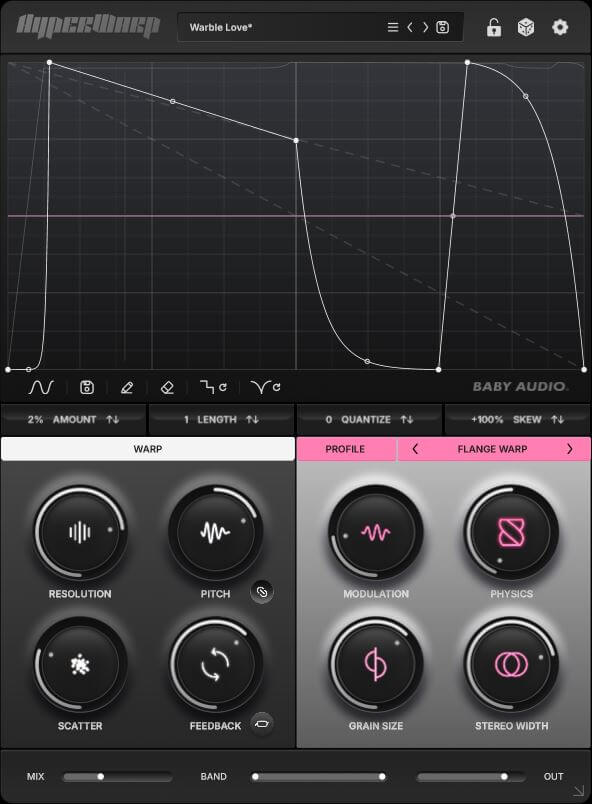
It’s all easy to understand, although mastering the relationship between different curve shapes and playback behavior takes a little experimentation.
HyperWarp includes 2 graph randomizers that make exploring different patterns particularly enjoyable. Random (steps) generates abrupt rhythmic changes and glitch-like sequences, while Random (curves) produces smoother transitions and more fluid speed variations. A separate randomization function can generate new parameter combinations. Individual settings can be locked to preserve elements you already like. What I particularly enjoy is how quickly you can move from a simple idea to something unexpected. The randomizers are great for inspiration, but you can always refine the results manually.
It’s an intuitive workflow that encourages experimentation without getting in the way of creativity.
The Granular Engine
What makes this tool different from conventional time-manipulation effects is its granular engine. Instead of simply changing the playback position or speed of an audio buffer, HyperWarp divides the incoming signal into tiny fragments (grains), which can then be manipulated and reconstructed. This enables familiar rhythmic effects while simultaneously opening up significantly more creative possibilities.
One interesting feature is the ability to manipulate time without necessarily changing pitch. In Clean Warp, for example, timing and pitch can be adjusted independently. Flange Warp, on the other hand, can introduce the familiar pitch changes associated with tape-style speed manipulation. Controls for grain resolution, scatter, feedback, and other parameters allow even relatively simple sounds to develop unexpected harmonics, digital artifacts, and evolving textures.
This is where HyperWarp becomes much more than another glitch effect. It can transform ordinary audio into entirely new sonic material. I really like that possibilities.


7 Effect Profiles
HyperWarp offers seven effect profiles, each with four dedicated macro controls that influence the behavior and character of the granular engine.
Clean Warp provides relatively transparent time manipulation, making it a good starting point for rhythmic effects.
Flange Warp offers metallic resonances, modulation, and tape-inspired textures, while Degrade Warp takes things into rougher, lo-fi territory with digital artifacts and distortion.
Filter Spam applies filtering at the grain level, creating constantly shifting timbres and unusual resonances.
Harmo-Nicer focuses on harmonic manipulation and pitch-shifted grains, adding harmonically related material that can sometimes produce almost arpeggiator-like structures.
Fauxcoder delivers vocoder-inspired resonances and harmonically rich textures, while Lo-Fizzly introduces digital downsampling characteristics with gritty and sometimes surprisingly organic results.
What makes these profiles interesting is how differently they respond to the same time pattern.
A sequence that sounds relatively clean in one mode can become metallic, distorted, or harmonically complex in another. This makes switching between profiles an enjoyable part of the creative process. For example, choose a preset and then step through the various profiles – you can get some wonderful results!
Creative Applications and Sound Design
HyperWarp is obviously well suited for electronic music, particularly when working with drums, percussion, and rhythmic loops. A simple drumloop can quickly become a completely different rhythmic structure, with unexpected fills, reverses, and stutters.
However, I find the more subtle applications just as interesting. One of my favorite ways to use HyperWarp is on ordinary pad sounds that feel a little too static. By blending in just a few percent of the processed signal using the wet/dry control, I can introduce subtle movement and variations without significantly changing the original character. It’s a simple trick, but it works wonderfully for making atmospheric sounds feel more alive.
HyperWarp also offers plenty of possibilities for vocals, synthesizers, guitars, and other melodic material. Depending on the selected profile, you can create unusual harmonic layers, evolving textures, or completely abstract transformations.
Another useful approach is to apply the effect selectively throughout an arrangement. A little use of granular signal processing before a transition, or a rhythmic interruption at the end of a phrase, can add variety without cluttering the production. The global wet/dry control and filtering options for the processed signal make it easier to integrate even more extreme effects into a mix. Automation is key here!
For me, this versatility is one of HyperWarp’s strongest qualities. It works equally well as an experimental sound design tool and as a subtle enhancement effect.
Randomization and Presets
HyperWarp includes 190 simply great sounding presets covering rhythmic manipulation, glitch effects, atmospheric textures, and more experimental sound transformations. They’re a useful starting point, particularly when exploring the different profiles.
However, the real fun begins when you start modifying them or creating your own patterns.
The combination of graphical editing, parameter randomization, and selective locking makes it easy to discover interesting variations without losing control over the entire sound.
Of course, not every randomly generated result is musically usable. Some settings can certainly produce chaotic textures, but that is precisely what makes such an experimental effect so appealing. I love experimenting with tools like this and creating “happy accidents.” The most interesting results often emerge when the right balance between unpredictability and control is found.
HyperWarp vs ShaperBox 3 and Gross Beat
In some ways, HyperWarp reminds me of Cableguys’ ShaperBox 3, particularly when it comes to rhythmic manipulation and creative sound processing.
However, its graphical time-warping workflow actually has more in common with Image-Line’s Gross Beat (released around 2009). While Gross Beat primarily manipulates audio playback through buffer-based processing, HyperWarp takes a different approach with its granular engine.
This allows it to go beyond conventional time manipulation, producing everything from evolving granular delays and tape-inspired textures to unusual harmonic effects and complex glitches.
The familiar graphical workflow makes these possibilities surprisingly accessible.
Of course, HyperWarp doesn’t make Gross Beat or ShaperBox 3 obsolete. All three plugins have their own strengths, and there’s considerable overlap in certain applications.
Personally, I particularly enjoy combining HyperWarp with ShaperBox 3 in the same insert effect chain. I’ve achieved some excellent results by using ShaperBox for precise rhythmic modulation while letting HyperWarp introduce additional granular textures and more experimental sound transformations. These two VSTs suit perfectly to each other in my opinion.
For me, HyperWarp’s strength lies not simply in its ability to reproduce familiar time-manipulation effects; rather, it takes the concept into new, far-reaching sonic realms.
Room for Improvement
Despite its creative potential, HyperWarp does have certain limitations. One feature I would like to see is the ability to freely choose the sequence length. While HyperWarp offers various length settings of up to four bars, it is currently not possible to set custom values – such as 3 or 5 bars.
This would be particularly useful for unconventional rhythmic patterns, odd time signatures, and experimental arrangements, as these types of patterns generate greater tension and variety.
Verdict & Summary
Baby Audio has once again delivered an inspiring creative tool that combines powerful sound manipulation with an intuitive workflow.
Another striking feature is Baby Audio’s attention to detail. Even the smallest elements of the user interface have been thoughtfully designed. I rarely come across plugins where the icons on the knobs change in such an interesting way as you turn them. It is just a small thing, but these are exactly the kinds of details I appreciate – they show just how much care went into the overall experience.
HyperWarp’s seven effect profiles, flexible time editor, and granular engine offer plenty of possibilities, from extreme rhythmic glitches to subtle movement and evolving textures. I particularly appreciate how even a small amount of processing can bring otherwise static sounds to life.
I absolutely love experimenting with HyperWarp and exploring new sonic territories during my sound design sessions. It’s one of those plugins that constantly inspires you to try something different, often leading to unexpected and exciting results.
At its introductory price of €44 (regularly €89), HyperWarp offers excellent value for producers and sound designers.
A versatile and genuinely inspiring effect that makes experimenting with sound both easy and rewarding. HyperWarp earns the Sounds of Revolution VALUE AWARD!

Visit my BLOG for other vst recommendations, production tips and more!
Cheers,
Oliver Schmitt aka Sounds of Revolution (SOR)