Review Minimal Audio Lucid
Minimal Audio Lucid – Wild Grains, Perfect Harmony
Granular processing has hooked me for years. Throw a vocal, a drum oneshot or a two-second scrap of audio in, and what comes out has little to do with the source anymore. Lucid was always going to land on my screen sooner or later.
I’m a Minimal Audio fan, too. Rift is still the distortion I open first. Morph EQ is just brilliant. Both offer great depth without requiring you to click through menus for minutes on end, and Lucid works the same way. It is simply straightforward, and those are exactly the kind of tools I really like.
More Than Another Granular Effect
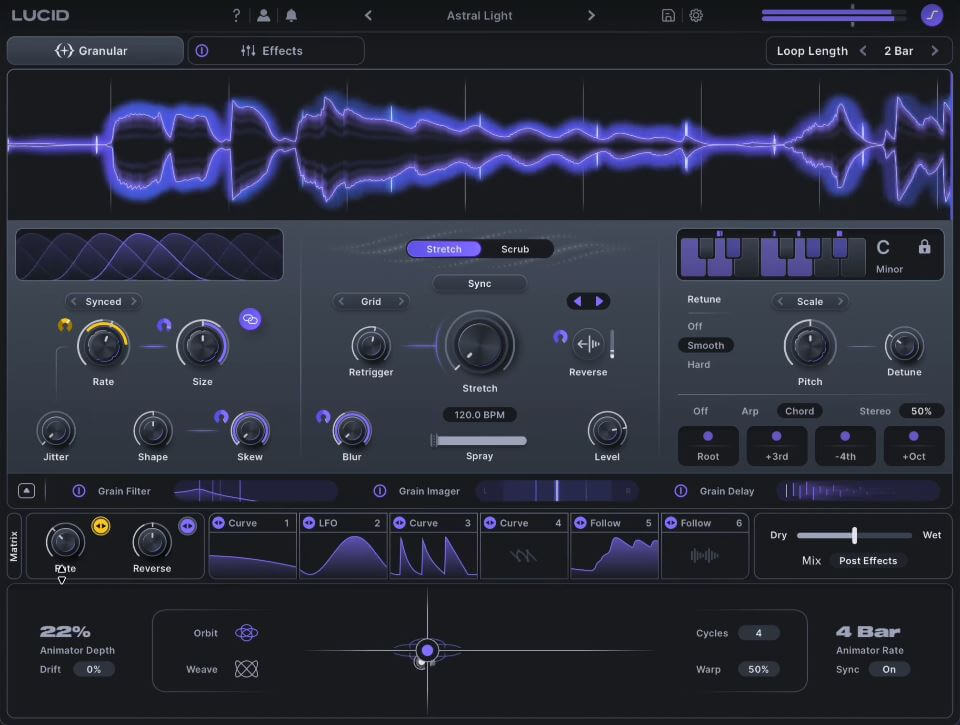
Lucid records incoming audio and chops it into grains. Grain Rate, Size, Jitter, Shape and Skew decide how those fragments behave. The waveform display shows you exactly what’s going on, which really helps when you’re pushing things. You can lock tightly to the project tempo, build stutters and glitches, or freeze a moment in place. You can also completely change the relationship between the processed signal and the source.
Stretch and Scrub are two ways through the recording. I keep coming back to Scrub, because I can drag through the material by hand or let a modulator take over. Spray scatters the grain positions, randomly but on a leash. Reverse isn’t a plain on/off switch. No, you set how many grains run backwards, and that sounds much more alive than turning the whole signal around.
Hold freezes the capture. New audio keeps coming in, and you keep working on the frozen piece.
Yeah, that’s how I like to work. One sound goes in, and two minutes later I’m somewhere I didn’t plan to be. Lucid consistently offers wonderful surprises.
Keeping Chaos Musical
I believe the scale system is the best thing about Lucid. It analyzes each grain and retunes it to a key and scale you choose. Smooth or Hard retuning, your own custom scales, chords and arpeggios built from the grains. Even at extreme settings, the result still blends well into the track – something rarely, if ever, found in comparable tools. And what about wild textures that stay in key? Oh yes, I’m all for that.
It works best when the source has a clear pitch. Dense polyphonic material gets less predictable (I don’t mind, a bit of mess is half the fun).
The arpeggiator only has four steps. Four. Next to everything else in this plug-in that feels stingy, and I’d like more steps plus control over each one in a future update.











Every Grain Becomes Part of the Sound
Each grain can run through its own Filter, Imager and Delay. The filter keeps the tone shifting all the time, while the Imager sends grains around the stereo field in several movement patterns. The Grain Delay has multiple taps, pitch shifting, filtering and some spatial tricks on top.
After a minute the grains stop sounding like copies of one snippet. They act like separate voices inside one texture. A plain source picks up width, rhythm and movement, and I never needed a complex external effects chain to get these results.
Version 1.1 adds two modes to the grain filter. Modal gives you tuned, resonant textures. Vowel does formant filtering on the grain level. Both are very welcome.
Modulation Is Where Lucid Comes Alive
Let’s talk about modulation. There are LFOs, freely drawable curves, an Envelope Follower and two Macros, and the Animator XY pad moves both Macros at once, with automated motion if you want it. Assigning takes seconds, by drag and drop or in the matrix. It’s super easy to work with.
Hook up a handful of parameters and Lucid starts doing things on its own. Grain position, pitch, filter, stereo placement and effects feed into each other constantly. I build the system, lean back and listen.
It adds movement to my samples/loops/pads that I’d otherwise automate by hand for an hour. Honestly, this tool is simply addictive.
Effects and Presets
The effects rack has up to twelve slots – so much to choose from: chorus, compressor, delay, distortion, reverb, EQ, filter, shifter. You can reorder them freely and load the same effect twice. I rarely feel the urge to put another plug-in behind Lucid. And believe me, that’s the case with very few plugins!
Over 350 (!) presets ship with it, covering tuned effects, harmonies, stutters, ambient textures and plain destruction. Some are properly good. I once lost an afternoon in the browser.
Still, most of the time I start from an empty patch. Last week I fed it a field recording of a creaking wooden door that had been sitting in my library for ages with no use. Scrub on slow modulation, Spray turned up a little, scale locked to D minor. Ten minutes later I had a pad that still creaked at the edges. Not pretty in the usual sense, but exactly the texture the scene needed. I bounced it and moved on.
Lucid in My Sample Pack Workflow
Of course I also use Lucid when I build sample packs. A pad loop starts almost dry, barely touched, just the raw sound. Then I let automation move the grains across the loop: the position drifts, the scale shifts the pitch, the Imager opens the stereo field bit by bit. By the end it’s a totally different sound from the one at the start, and that arc gives the loop a tension a static bounce never has. Producers pick up on that, I’m sure – even if it’s often hard to tell exactly how it was done. And I just like that kind of approach.
The opposite direction works of course too. On a drum loop, Lucid can add rhythmically tight grain layers locked to the grid, and the loop gets extra life without losing its groove.
That surprised me, since granular is usually my tool for loosening things up or making it more interesting.
Where Lucid Stands / Competition
There is lots of competition: Output Portal, Baby Audio Grainferno, Sugar Bytes Graindad, Arturia Efx FRAGMENTS, Audio Damage Quanta 2, Dawesome Novum and SoundMorph Dust all approach granular differently. Many lean toward the dreamy, the abstract or the random. Lucid can go there, but it doesn’t have to. And that’s the difference!
What sets it apart is how close the grains stay to the music. Timeline sync holds them in time, and the scales hold them in key. So Lucid isn’t the effect I grab when I want something strange. It’s a normal part of the session. And that’s simply fantastic!
The interface is super clean and modern, typical Minimal Audio. Personally, I really like this look. The GUI features a lot of wonderful, detailed work. There’s a lot under the hood, and beginners will need a while to see how the sections connect. After that it flows surprisingly well.
Version 1.1 also brings a Low Latency mode, which makes live playing and real-time processing realistic. The price is less accurate pitch tracking on fast-changing material. I’d still take the option over not having it.
Verdict & Summary
Minimal Audio never disappoints, and Lucid is another great example. This thing is a beast!
What really sets Lucid apart is its scale-aware tuning. Instead of getting lost in endless random granular clouds, the grains stay in key, even with extreme processing. It’s a simple idea, and it makes a huge difference.
Lucid is wild, creative, and unpredictable, but always musical. You get highly useful results in no time, which you can’t say about every tool of this kind!
Add the excellent modulation, per-grain effects and extensive effects rack, and it almost feels like a synthesizer of its own. The new Low Latency mode in version 1.1 is another welcome addition.
For me, Lucid is one of the freshest and most inspiring takes on granular processing in years. Absolutely addictive!
SOUNDS OF REVOLUTION AWARD – Creative chaos that stays in tune!

Visit my BLOG for other vst recommendations, production tips and more!
Cheers,
Oliver Schmitt aka Sounds of Revolution (SOR)