Review Acon Digital Resoration Suite 3
Acon Digital Restoration Suite 3 Review: Intelligent Audio Restoration at an Incredible Price
I have to admit that Acon Digital hasn’t really been on my radar over the past few years. Interestingly, the company has been developing audio restoration tools for quite some time, with the first version of Restoration Suite dating all the way back to April 2013.
Until now, I’ve mainly relied on iZotope RX and Waves tools such as Clarity Vx Pro and their good old Restoration Bundle for my audio restoration work, whether that meant removing background noise, engine sounds from vocal recordings, or other distractions. These tools have served me well, so I never really felt the need to explore many alternatives. When a producer friend of mine recommended taking a closer look at Acon Digital, I decided it was finally time to give their restoration tools a try.
And I can already say this much: Restoration Suite 3 has genuinely impressed me. Not only because of its capabilities and straightforward workflow, but especially because of its exceptional value for money. With a regular price of just $99 for the entire package, the amount of functionality and processing power you get is quite remarkable.
But what exactly makes Restoration Suite 3 so interesting, and how does it compare to the tools I’ve been using for years? Ok, let’s dive in.
What’s New in Restoration Suite 3?
Restoration Suite 3 introduces several significant improvements to Acon Digital’s restoration toolkit. The package includes four dedicated plug-ins, DeNoise 3, DeHum 3, DeClick 3, and DeClip 3, alongside a completely new all-in-one plug-in that combines all four processors within a single interface.
The biggest innovations are the machine learning-based Automatic modes in DeNoise 3 and DeHum 3, redesigned interfaces for DeClick 3 and DeClip 3, and an intelligent analysis system that automatically identifies recording problems and creates a suitable processing chain.
This makes the suite particularly interesting for sound designers, music producers, and dialogue editors who regularly deal with imperfect recordings.
The New All-in-One Restoration Plug-in
Probably the most exciting addition is the new Restoration Suite 3 plug-in itself. Instead of manually identifying audio problems and configuring multiple processors, users can simply activate the Analyze function and play a short section of their recording.
The plug-in analyzes up to ten seconds of audio, checking for clipping, clicks, crackle, electrical hum, and broadband noise. It then automatically selects the required modules, arranges them in an appropriate order, and adjusts their main parameters. This “suggested plugin chain” is something you also see in tools from iZotope, for example. It’s simply a practical way to work.
For example, a field recording containing electrical interference and background hiss might automatically receive DeHum 3 followed by DeNoise 3. A damaged vinyl recording could trigger DeClick 3 and DeNoise 3.
What I particularly appreciate is that the automation doesn’t take away control. Every module remains fully editable, allowing users to fine-tune parameters, change the processing order, or add and remove processors manually. Complete processing chains can also be saved as presets. For anyone regularly working with different types of recordings, this approach can save considerable time while still providing the flexibility needed for more demanding restoration tasks.
And how does it sound? Even though I wasn’t expecting it – the quality is fantastic, and for me, it’s superior to, for instance, Waves Clarity Pro.












DeNoise 3: AI-Powered Noise Reduction
DeNoise 3 is one of the highlights of this update. Its new machine learning-based Automatic mode detects and reduces broadband noise without requiring a manually captured noise profile. Typical applications include removing microphone hiss, preamp noise, air conditioning, camera noise, and unwanted background sounds from dialogue or instrumental recordings. The Noise Floor slider determines how much of the original noise remains in the processed signal. This is particularly useful because completely eliminating background noise isn’t always desirable. Excessive reduction can introduce artifacts or remove subtle details that contribute to a recording’s natural character.
A flexible reduction curve with low-shelf, bell, and high-shelf filters allows users to focus processing on specific frequency ranges. For more complex material, Manual mode remains available, offering traditional noise-profile-based processing with additional controls.
Mid/Side processing helps preserve the stereo image, while the Solo Noise function lets you hear exactly what the algorithm is removing. I find this especially useful when working with field recordings, where subtle environmental details are often an important part of the sound.
DeHum 3: Removing Electrical Interference
DeHum 3 also benefits from machine learning technology, allowing it to identify and suppress electrical hum and buzz automatically.
The plug-in offers three processing modes:
- Automatic: Detects and removes tonal interference without requiring manual frequency adjustments.
- Precision: Provides detailed control over the fundamental frequency, harmonics, and sensitivity, including adaptive tracking for interference that changes in pitch.
- Notch: Uses conventional notch filters with low CPU consumption and zero latency.
Additional features include a frequency-dependent reduction curve, Mid/Side processing, and a Solo Hum function for monitoring the removed signal. DeHum 3 is particularly useful for recordings affected by grounding problems, electrical equipment, or motor-related tonal interference. For more complex background sounds, combining it with DeNoise 3 may provide better results than relying on hum reduction alone.
DeClick 3: Repairing Clicks, Crackle, and Plosives
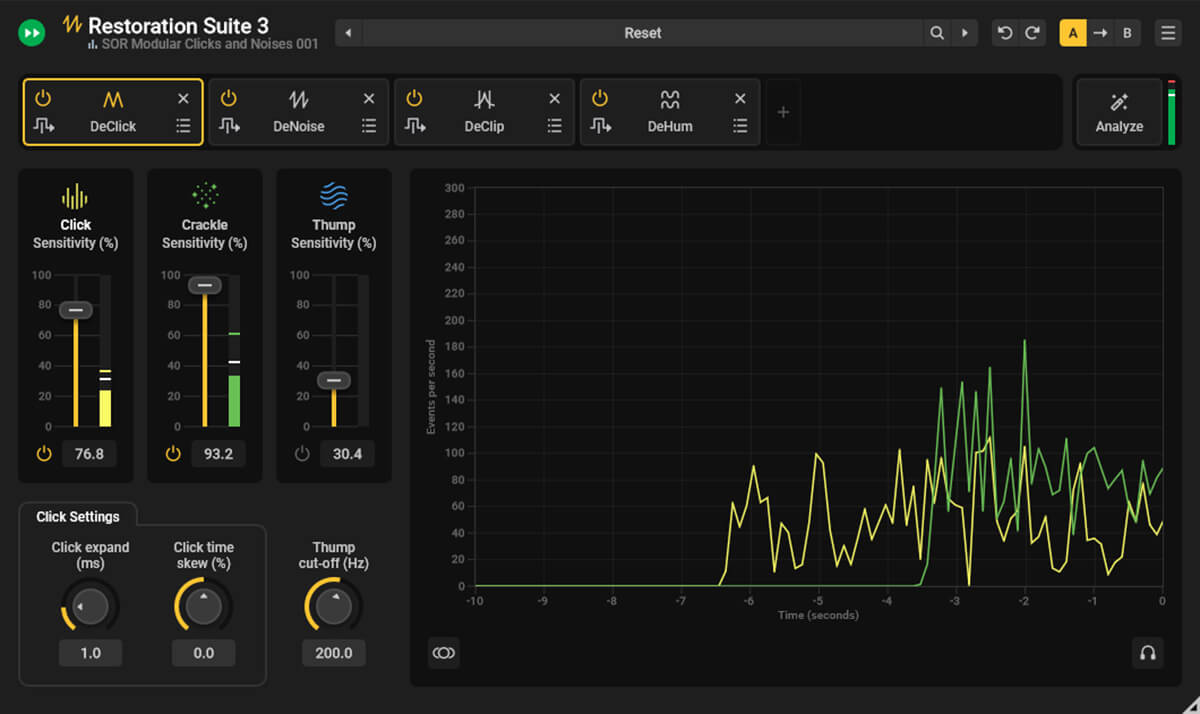
DeClick 3 focuses on removing short, unwanted disturbances such as clicks, pops, vinyl crackle, digital dropouts, and low-frequency thumps.
Three independent algorithms handle different types of problems:
- Crackle: Removes dense, short-duration disturbances.
- Click: Targets larger clicks and pops.
- Thump: Addresses low-frequency impacts and plosive sounds.
Each algorithm features adjustable sensitivity, while additional parameters allow users to control how damaged audio sections are reconstructed. A visual reduction meter displays recent processing activity, and the Solo Noise function helps identify exactly what is being removed.
For sound design, this is particularly interesting because field recordings often contain unwanted clicks or handling noises that become more noticeable during further processing. However, when working with percussion or transient-heavy material, sensitivity settings should be adjusted carefully to avoid affecting intentional transients.
DeClip 3: Restoring Distorted Recordings
DeClip 3 attempts to repair recordings affected by analog or digital clipping by reconstructing flattened waveform peaks from the surrounding undistorted audio.
The plug-in includes automatic clipping-level detection, adjustable positive and negative thresholds, and a detailed level histogram.
Input and output gain controls provide the necessary headroom for reconstructed peaks, while adjustable processing quality allows users to balance accuracy against CPU consumption.
Naturally, no declipping algorithm can perfectly recover information that has already been lost. Nevertheless, DeClip 3 can significantly improve recordings that would otherwise be difficult to use.
This makes it especially valuable for live performances, interviews, and spontaneous field recordings where repeating the original recording isn’t an option.
Workflow and DAW Integration
One of Restoration Suite 3’s strongest advantages is its straightforward workflow. All four restoration processors can be used individually or combined within the new all-in-one plug-in. Modules can be added, removed, reordered, and bypassed without interrupting their internal processing, allowing convenient before-and-after comparisons without changing latency.
The suite also supports AudioSuite processing in Pro Tools, making it possible to analyze and permanently process selected audio clips. Users of Acon Digital’s Acoustica 8 (their audio editor) can access the restoration functionality directly through the application’s native processing environment, combining general audio cleanup with more detailed spectral editing when necessary.
For producers and sound designers who prefer working directly inside their DAW, this flexibility is really welcome.
The User Interface
Restoration Suite 3 retains the functional design of its predecessor, though DeClip and DeClick have received refreshed interfaces. It may not be the most visually appealing restoration software on the market, but its straightforward layout keeps the focus on what matters: getting the job done.
One particularly welcome feature is the fully scalable GUI, which can be adjusted to virtually any screen size. My criticism is that the look could be more modern, and the dark-only design leaves no alternative. A light mode would be welcome, especially for long sessions or bright work environments.
The real improvement lies in the workflow rather than the aesthetics. The new all-in-one plug-in analyzes your audio and sets up the required modules automatically, and the machine-learning modes in DeNoise and DeHum remove the need to capture a noise profile. This makes restoration considerably more accessible and efficient.
Acon Digital Restoration Suite 3 vs. iZotope RX and Waves Clarity Vx Pro
Until now, my restoration tools were the well known iZotope RX and Waves Clarity Vx Pro and Restoration Bundle, so I was naturally curious how Acon Digital’s approach compares.
iZotope RX remains one of the most comprehensive restoration environments available, with a huge collection of specialized tools and advanced spectral editing. Restoration Suite 3 is more focused: it covers four essential tasks (noise reduction, hum removal, click repair, and declipping), and its biggest strength is the streamlined workflow. The automatic analysis identifies common recording problems and builds a suitable processing chain within seconds.
Of course, RX offers tools that go well beyond the scope of Restoration Suite 3. Dedicated dialogue processors like Clarity Vx Pro serve a different purpose as well and are not directly replaced by Acon Digital’s algorithms.
I wouldn’t consider these products mutually exclusive. Depending on the source material and the complexity of the problem, each can have its place in a professional production environment. But given the significant price difference, Restoration Suite 3 is an extremely attractive option for anyone looking for a powerful yet affordable restoration toolkit.
I tested their suite with many different and sometimes really heavy recordings and, by and large, consistently achieved impressive results, kudos!
In a direct comparison, the results are often virtually indistinguishable, and yes, that is truly impressive!
Tool Misuse for Sound Design: Using Restoration Tools Creatively
Restoration tools aren’t only useful for cleaning up audio. Used outside their intended purpose, they can become surprisingly interesting sound-design tools. Two examples I found especially inspiring:
DeClip as a distortion generator
Lower the threshold in DeClip 3 from -20 dB all the way down to its maximum of -48 dB, and the plug-in starts adding a distinctive kind of distortion or noise floor to certain loops, even ones I had considered finished. This often helps a sound cut through the mix more effectively. It’s clearly a departure from what the tool was built for, but that’s exactly what makes it so compelling.
DeHum as a tool for thinning out tonal loops
DeHum 3 can also strip back a tonal loop that feels too “full”. Switch to Notch mode, set the frequency to 500 Hz (the maximum), enable Solo, and dial in harmonics 1 through 6 (works best) as needed. The result is a reduced, stripped-back version of the original loop, which is great for breakdowns, intros, or variations.
Pricing and Value for Money
With a regular price of just $99, Restoration Suite 3 offers four dedicated restoration processors alongside the new intelligent all-in-one plug-in. The software is available with a perpetual license, so there’s no subscription requirement. Considering the machine learning-based processing, automatic analysis, and range of restoration tools included, I find the pricing exceptionally competitive. Of course, the ultimate measure of any restoration tool is how effectively it removes unwanted noise while preserving the original recording. Nevertheless, Acon Digital delivers an impressive amount of functionality for the money.
Verdict & Summary
Acon Digital Restoration Suite 3 makes me wonder why I didn’t take a closer look at this developer sooner. Intelligent automatic analysis, machine learning-based noise reduction, flexible manual controls, and a real straightforward workflow add up to a highly attractive restoration package.
The new all-in-one plug-in is a convenient starting point for audio cleanup, while DeNoise 3 and DeHum 3 benefit greatly from their new automatic modes. DeClick 3 and DeClip 3 round things off. For my own work with lots of field recordings and sound design, being able to fix common recording problems quickly is a great advantage.
Specialized tools like iZotope RX remain valuable for complex restoration jobs, but at just $99, Restoration Suite 3 offers remarkable value, especially for budget-conscious users who don’t earn their living from this work. For sound designers, music producers, dialogue editors, and anyone dealing with imperfect recordings, this one is definitely worth checking out.
Acon Digital Restoration Suite 3 clearly deserves the Sounds of Revolution VALUE Award. So much quality at such a low price, simply impressive!

Visit my BLOG for other vst recommendations, production tips and more!
Cheers,
Oliver Schmitt aka Sounds of Revolution (SOR)