Review Lunacy Audio BEAM 2.0
I’ve been a fan of Lunacy Audio for quite a while now. Ever since they released CUBE, which I still consider one of the most inspiring synths out there, I’ve been following their work closely. CUBE has been sitting in my Best Synth VST Plugins category for a reason – it’s one of those rare instruments that feels both unique and genuinely useful.
So when BEAM originally came out, I was immediately interested. And with BEAM 2.0, Lunacy Audio didn’t just update the plugin – they clearly pushed the whole concept forward.
I’m working with the full BEAM Bundle, which includes the interactive effects engine, all current effect nodes, more than 450 presets and over 150 impulse responses. And I can already say this upfront: the BEAM Bundle is easy to recommend. It feels like a complete, well thought-out package that gives you everything you need to really explore what BEAM is capable of.
A Creative Tool First – Not Just Another Effect
What I’ve always liked about BEAM is that it doesn’t try to be a clean or clinical effect. It’s a creative tool first and foremost. Something you reach for when a sound feels flat, unfinished, or simply uninspiring. You can take a very simple source – a melody, a pad, or even a basic loop – and turn it into something completely different within seconds. By adding convolution, pitch shifting, modulation or time-based processing, you quickly end up in a completely new sonic space. That’s also why I often use BEAM when I feel stuck. It’s one of those plugins that helps you move forward fast, even when you’re not entirely sure where a track should go yet.
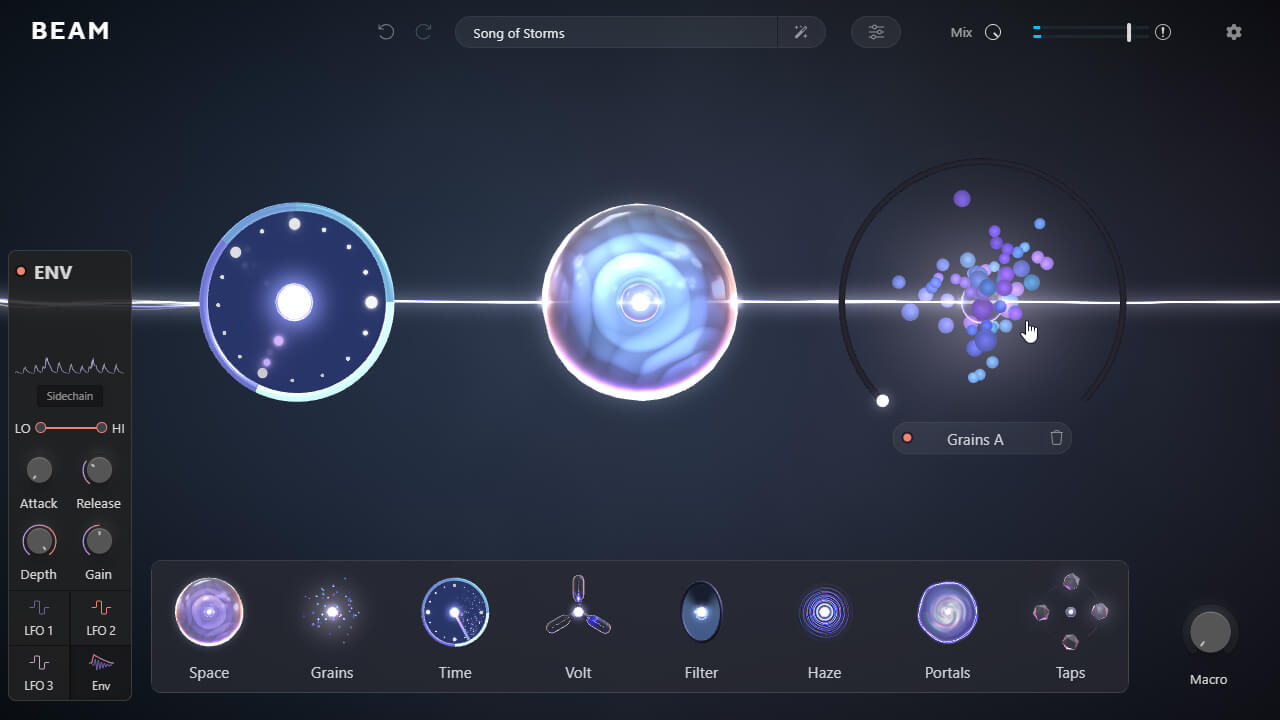
BEAM is especially well-suited for sound design in music, film, and game audio. I personally use it a lot for dub techno, where static material benefits greatly from movement and depth. With features like granular processing, convolution reverb, and a wide range of modulation options using multiple LFOs and filters, sounds can be transformed very quickly into something more organic and alive.
The Taps expansion deserves a special mention as well. It adds a lot of creative depth and allows for expressive delay processing that goes far beyond standard delay effects. Out of the four current preset packs – Embers, Patterns, Fractals, and Aura – I especially enjoy working with Fractals. It’s great for creating interesting fragments in a very intuitive way, which then serve as a solid starting point for further sound design.
Since I mainly create techno sample packs and currently feel very much at home in the dub techno realm, I often work with wide, reverberant spaces and sounds with a strong atmospheric density. This is exactly where BEAM really shines. Even the simplest field recordings can be turned into beautifully organic textures within seconds. I also like feeding BEAM with just a few one-shots or short fragments and then building from there. Used subtly, it delivers fantastic results. Used too heavily, it can easily become too much – but that’s part of its creative power. With that in mind, let’s dive into the review.
What’s New in BEAM 2.0
Every BEAM module is now available as a standalone plugin, which is a really smart move. You no longer have to load the full BEAM environment if you only need a specific effect, and individual modules can even be purchased separately. That alone makes the whole ecosystem much more flexible.
I personally enjoy working with the standalone effects directly in my DAW, as it keeps things fast and straightforward. For many situations, that’s all I need. But whenever I want more complex routing or deeper processing chains, I simply jump back into BEAM itself. Having this level of flexibility is great and makes the entire system feel very well thought out.
Haze – Easily One of the Highlights
The new Haze effect is a standout. It sits somewhere between reverb, chorus, and dispersion, and it sounds exactly like you’d expect: wide, dreamy, and slightly unstable in the best possible way. If you’re into ambient textures, cinematic sound design, or shoegaze-style atmospheres, this thing is a lot of fun. Combined with BEAM’s modulation options, it can quickly turn even the simplest source into something deep and organic.
More Modulation, More Control
Lunacy Audio BEAM 2.0 introduces a third LFO with over 20 new shapes. Creating and editing modulation curves is fast and intuitive, and you can save your own shapes for later use. There’s also a new sidechain mode for the envelope follower, which opens up a lot of practical use cases – from dynamic reverbs to movement that reacts directly to the input signal.
Improved Filters and Sound Shaping
A smaller but very welcome update: the filters now offer adjustable slopes. This makes a big difference, especially when you’re working with layered sounds or bass material. You can be much more precise when separating lows, mids, and highs, which makes BEAM feel more controlled without losing its experimental nature.
Randomization Done Right
One thing that really stands out to me is how good the randomizer in BEAM actually is. A lot of plugins offer randomization, but in practice, the results are often unusable. Either too extreme, too chaotic, or simply not musical. BEAM feels different here. The randomizer usually creates results that already make sense sonically and often spark ideas instead of killing them. What I like most is that it doesn’t feel random for the sake of it. You get surprising results, yes – but very often they’re usable right away or just need a small tweak. That makes experimenting fun instead of frustrating, and it’s one of the reasons I keep coming back to BEAM so often.
Workflow Improvements
- New impulse categories for the convolution engine
- Improved preset organization
- Search by author
- Default patch settings
- Overall UI and performance optimizations
- Global Mix Lock maintains your perfect blend while you experiment with different presets.
The Global Mix Lock is one of those features you don’t want to miss once you’ve used it. Developers surprisingly often forget it, yet it’s incredibly useful in practice, especially when you’re auditioning presets and want to keep your balance intact.
FINAL THOUGHTS
What really stands out to me is that BEAM doesn’t just look good – it actually delivers sonically and in terms of workflow. Just like CUBE, it’s obvious that a lot of thought went into both the design and the usability.
The visual side is beautiful, but it never feels like style over substance. Everything has a purpose, everything feels responsive, and the whole plugin gives the impression that the developers genuinely thought things through.
For me, Lunacy Audio Beam is one of those tools that I keep coming back to. It’s fast, inspiring, and constantly sparks new ideas. Whether for sound design, experimental music, or simply breaking creative blocks, it earns its place in my setup.
A very strong update – and another reason why Lunacy Audio remains one of the most interesting developers in this space.