Review Steinberg Cubase Pro 15
I’m not a music producer in the traditional sense. Most of my work revolves around sound design, loops, one-shots, and audio material that later ends up in many different productions. A large part of that work is focused on creating sample packs, as well as samples for virtual instruments such as D16 PunchBox. Even so, I’m regularly asked which DAW I rely on and why I’ve settled on a particular setup for this kind of work.
Cubase – Why I Still Use It After More Than 20 Years
Steinberg Cubase has grown into such a deep and versatile DAW over the years that covering everything would easily go beyond the scope of this article. Instead, I’m focusing on the parts that actually matter for my own workflow and that I use regularly.
I’ve been working with Steinberg software for more than 20 years, and I’m deeply rooted in that ecosystem. Alongside Cubase, WaveLab has been a core part of my setup for many years. It’s my go-to tool for fast audio editing, sample preparation, and batch processing. I’ve finalized thousands of samples in WaveLab, simply because it’s incredibly fast and precise for this kind of work. On top of that, I’ve created drum kits for Groove Agent that are permanently integrated into the factory library. All of this naturally shapes how I look at these tools.
I also use other DAWs and genuinely appreciate their strengths. Still, Cubase has remained my main DAW. Not out of habit, but because the workflow has proven to be consistent, mature, and reliable over many years.
Not songwriting, but material production
For my work, a DAW needs to offer precise control over audio, transients, and micro-timing, regardless of whether a full track ever comes together. Audio is never secondary here.
Loops aren’t static playback elements, but raw material meant to be edited, fragmented, and reshaped. That mindset aligns perfectly with how Cubase handles audio at a fundamental level.

Hitpoints: one of my most important tools
One feature I’ve relied on for years is Hitpoint editing. When working with rhythmic material, I use it to analyze transients, slice loops into fragments, and reassemble them into new grooves, variations, and textures while keeping the original character intact.
For my workflow, this is essential because it makes audio truly malleable without relying on time-stretching, which can compromise quality. Hitpoints are tightly integrated, so I can work fast and stay precise. I’ve built thousands of drum loops this way, and it’s one of the reasons Cubase still feels so relevant to me.
Cubase Pro 15: new features with real-world value
The redesigned Hub in Cubase 15 is a real improvement for me, especially because of the project preview feature. I have hundreds of sound design and loop sessions, many of them heavy on plugins and therefore slow to load. Being able to quickly preview projects in the Hub, instead of opening and closing them one by one, saves noticeable time and makes it much easier to rediscover older ideas.
On top of that, I can define project folders and check my audio setup directly in the Hub before opening anything. These are small details, but they remove friction in everyday work.
With Cubase 15, Steinberg focused on improvements that actually matter in day-to-day use. The Melodic Pattern Sequencer is not a gimmick, but a practical tool for generating rhythmic and melodic building blocks. Scales, shape generators, and controlled randomness add variation while keeping things musically coherent. For loop and pattern work, this is a genuinely useful entry point.
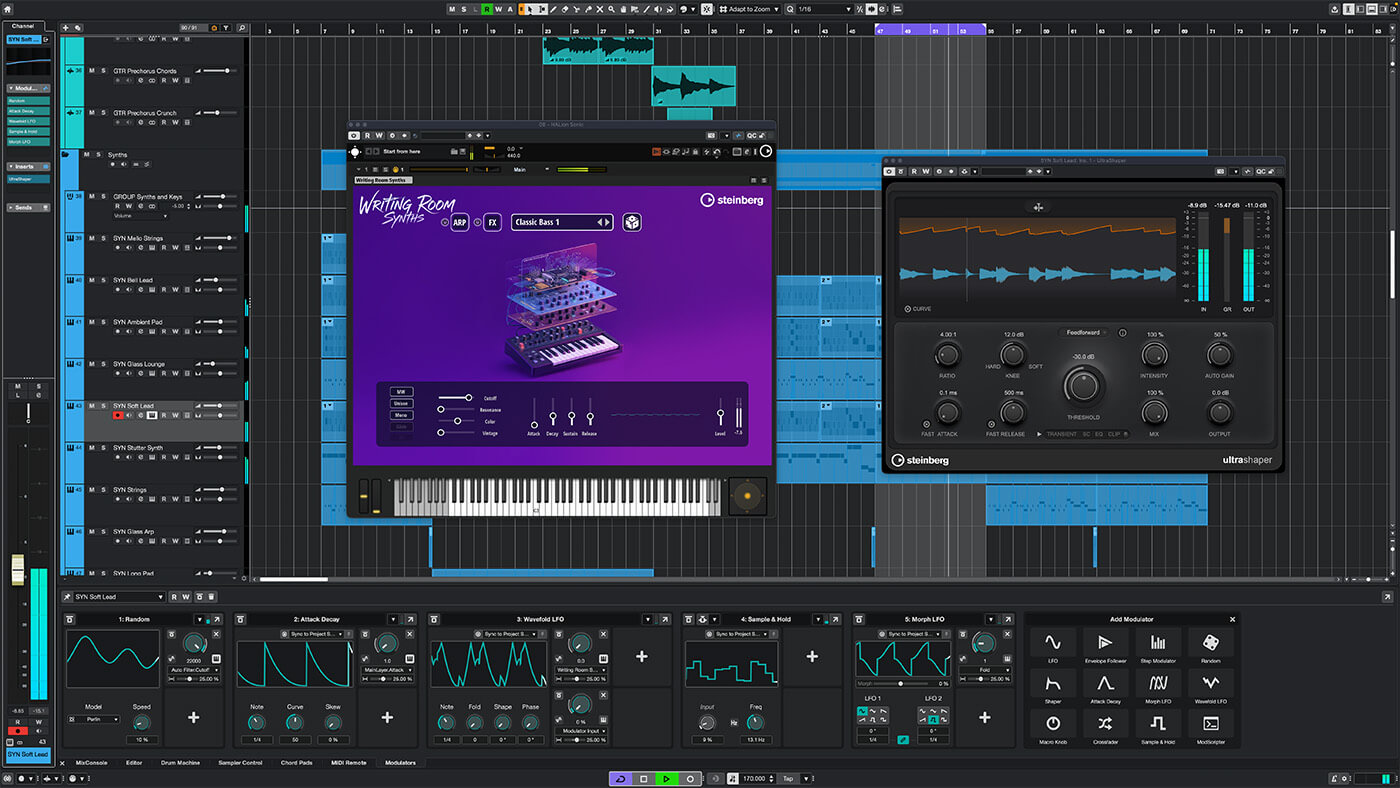
The expanded Modulators clearly point toward sound design. Parameters can be animated with movement, randomness, and rhythmic variation without drawing traditional automation. This keeps projects clean and encourages experimentation. The modulators particularly excite me as a sound designer!
The automation workflow itself has also improved. As soon as I touch a parameter, Cubase immediately makes it available for automation. I find this feature incredibly practical, and it greatly speeds up the workflow when it comes to automation. It saves time and keeps me in the creative flow.
I mainly see the integrated Stem Separation as an analysis tool, not as a creative remix feature. It allows me to isolate and listen to individual elements of a mix to better understand structure, balance, and dynamics. For analytical work and critical listening, this is genuinely helpful without crossing creative boundaries.
The real heavyweights in mastering


At this point, it’s worth mentioning how Cubase and WaveLab are used in professional mastering contexts.
I regularly exchange ideas with producers, sound designers, and mastering studios. When it comes to classic, professional mastering, Steinberg WaveLab is hard to ignore. Its core focus is clearly track and album mastering. Precise metering, PQ editing, DDP export, and delivery formats for streaming make it an ideal tool for the final stage of production.
At the same time, Steinberg Cubase Pro is widely used in professional mastering environments, especially for stem mastering. Many engineers appreciate its precise automation capabilities and very clean signal processing. Cubase is less about creative experimentation here and much more about precision, structure, and control.
A workflow I often see is this: processing and stem work in Cubase, followed by final assembly and delivery in WaveLab. In combination, the two form a setup that’s clearly geared toward clean editing, solid preparation, and repeatable results. If you ask me, it’s a hard team to beat.
There are DAWs out there that a mastering engineer would never, ever use for their work. And it’s no coincidence that Cubase is so frequently used in this field. I also know mastering engineers who are convinced that Cubase simply has the better engine compared to other DAWs. I don’t want to turn this into a fundamental debate, but it’s a perspective worth mentioning.
Verdict & Summary
Cubase’s efficient workflow and clean, intuitive design allow me to work quickly and stay focused when producing samples. I genuinely think it has one of the best layouts of any DAW, without unnecessary visual clutter. The interface stays readable even in complex projects and helps me keep a clear overview at all times.
I do use other DAWs from time to time, but even after more than 20 years, Cubase remains my primary DAW. It allows me to edit audio with precision, refine details meticulously, and prepare material in a reliable, professional way. Especially when working with large amounts of audio material, that level of control makes a real difference.
Cubase is not trend-driven and not minimalist. It offers an enormous depth of features that reveal their value over long-term use. It’s mature, precise, and dependable, which is exactly why it continues to be my first choice.
To make getting started with Cubase easier, I recommend the solid selection of tutorials available on Steinberg’s official channel.

Visit my BLOG for other VST recommendations, production tips, and more!
Cheers,
Oliver Schmitt, aka Sounds of Revolution (SOR)