Review LANDR Studio und Mastering Plugin Pro
LANDR STUDIO
If you only know LANDR as “that online mastering service,” you’re missing most of the picture. Founded in 2014, LANDR has already supported millions of musicians worldwide and has firmly established itself in the market. Over the years, it has grown into a full creative platform for musicians. It now combines mastering, samples, plugins, collaboration tools, learning content, and music distribution in one ecosystem.
Personally, I find this approach genuinely appealing. Making music today doesn’t just mean writing and producing. It also means dealing with plugins, samples, learning resources, release workflows, and distribution platforms. For many musicians, that landscape feels fragmented and overwhelming.
Having all of this under one roof is not just convenient, it’s goal-oriented. It reduces friction. Instead of jumping between half a dozen services, accounts, and subscriptions, everything lives in one place. For a lot of users, especially those working alone, this can be a real relief. It helps you stay focused on what actually matters: finishing music and getting it out into the world.
LANDR Studio is offered in three tiers: Essentials, Standard, and Pro. The differences are mainly about scale. More samples, more mastering options, more plugins, more storage, and more credits as you move up. The well-thought-out structure makes it clear that LANDR is not meant as a single-purpose product. It’s designed as an ecosystem.
What’s included?
Depending on the tier, LANDR Studio bundles a surprisingly broad toolset:
-
Unlimited AI mastering, including the LANDR Mastering Plugin
-
Unlimited distribution to 150+ streaming platforms
-
Up to 2,400 royalty-free samples per year from a library of over 3 million sounds
-
70+ effects and instrument plugins, including stem separation
-
200+ online music courses taught by professionals
-
Collaboration tools for remote sessions and more
This list alone makes it clear that LANDR Studio is not trying to replace a single tool in your setup. It’s aiming to cover the entire production-to-release pipeline in one coherent environment.
What really stands out to me are the included plugins. I don’t see them as throwaway extras, but as genuinely high-quality tools that can easily stand on their own. You can even buy them separately as a bundle. For me, they form a solid foundation that’s more than capable of carrying a production to a professional level.
Here is an overview of the LANDR Ecosystem:
Who is LANDR really for?
The real question is not “Is LANDR good?” but “Is bundling worth it for you?”
If you already have a trusted distributor, a carefully curated plugin collection, a robust sample workflow, and no interest in additional services, LANDR may seem redundant. But if you’re a one-person operation who writes, produces, mixes, masters, and releases your own music, the platform starts to make real sense. LANDR is clearly built for creators who want momentum. It doesn’t try to turn you into a mastering engineer. It helps you remove friction, finish songs, make them release-ready, and actually get them out into the world.
And truthfully, most producers out there fit this description rather well. They work alone, don’t have a large network, and simply don’t want to juggle half a dozen accounts across different platforms. I personally know several artists who have been using LANDR successfully for years and genuinely value the all-in-one approach. Not because it’s flashy, but because it removes obstacles and lets them stay focused on making and releasing music.
In my view, LANDR Studio is a remarkably coherent ecosystem. It doesn’t just offer tools; it creates a workflow that genuinely supports artists from the first idea to a finished, release-ready track. I’m usually skeptical of “all-in-one” promises, but here the concept actually holds together. LANDR isn’t about replacing your skills. It’s about removing friction between ideas, finished tracks, and release.

LANDR Mastering Plugin Pro
LANDR began as an online mastering service. You exported a stereo file, uploaded it, waited, and downloaded the result. The plugin brings that workflow directly into the DAW.
You insert the LANDR mastering plugin on your master bus like any other AU or VST, play the loudest section of your track, and let it analyze. Within seconds, it builds a mastering chain. There is no manual construction of EQs, compressors, limiters, or dynamic modules. The plugin listens, decides, and then gives you macro controls to steer the result. It’s a black-box approach by design. If your goal is “I want this track mastered so I can move on,” this is exactly the point.
The plugin offers three mastering styles: Warm, Balanced, and Open. These are not just cosmetic presets. Each style changes how the internal processing behaves. “Warm” tends to be smoother and rounder, “Open” brighter and more extended, with “Balanced” in between. It’s great that you can toggle between the style change in real time, which is often faster than overthinking tonal decisions.
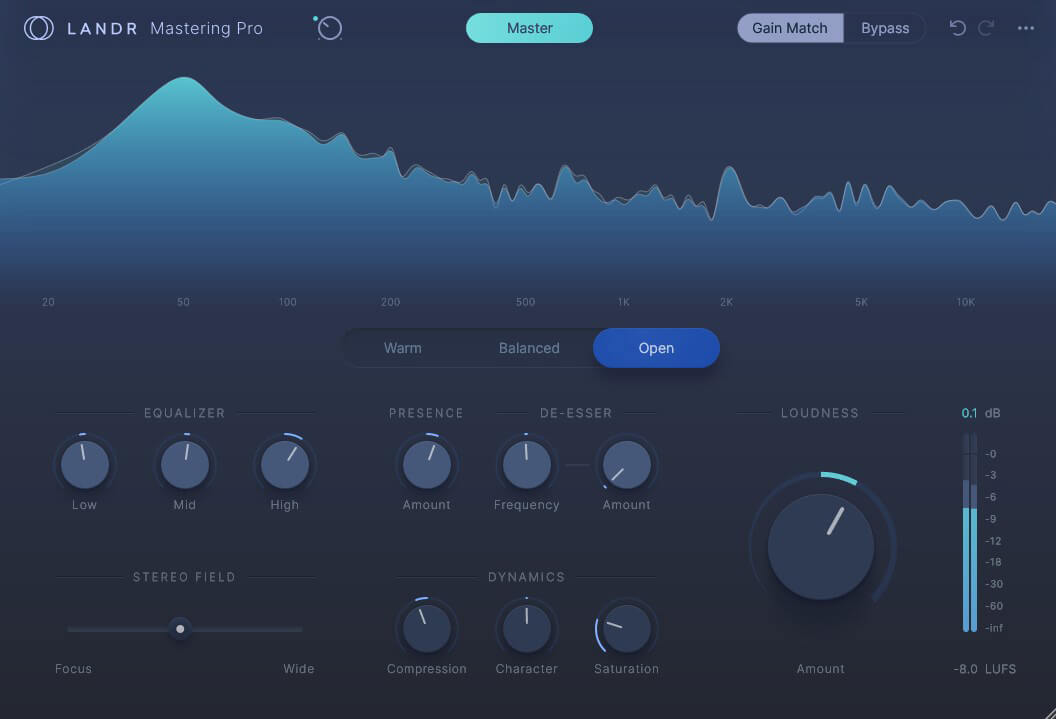
Controls – LANDR keeps everything intentionally broad:
– Low, mid, and high tonal shaping
– Stereo width and focus
– Compression with character control
– Saturation
– Presence control for the vocal range
– De-esser
– Loudness/amount
– Gain match for proper A/B comparison
That last point matters. Without gain matching, any mastering tool becomes a device that creates a loudness illusion. LANDR’s built-in level compensation makes it possible to judge changes honestly. The controls are macro by nature, but they’re meaningful. You can push the result in clear directions without turning mastering into a technical project.
Sound quality
Automated mastering still carries a stigma. Many producers remember pumping, brittle highs, and the “digital stress” of early AI solutions. Recent comparisons show that the current LANDR engine is far beyond that stage. The plugin delivers clean, modern results quickly. For electronic music in particular, it often lands very close to what you’d expect from a competent release master. The biggest advantage isn’t that it sounds magical. It’s what it gets you to “good” or even “great” extremely fast. That speed has a real psychological effect. It breaks the endless loop of tweaking, exporting, re-importing, and second-guessing that keeps so many tracks in limbo.
The whole process is so clearly laid out that it’s genuinely hard to mess things up. In most cases, you end up with a very solid result straight away, assuming the mix itself is fundamentally sound. I was surprised by how quickly you can find the sweet spot. I usually tweak loudness, presence, and EQ a little. The built-in saturation also sounds very pleasing and musical to my ears. It’s rare to achieve such a convincing result with so few, simple moves.
What really caught me off guard was testing LANDR on my own demo tracks. Over the years, these had been mastered in very different ways: by professional human engineers, with Ozone, with Flow, and other tools. By applying the LANDR mastering plugin to one or more already mastered (old) demo tracks, I was able to achieve additional improvements to one or more tracks. So even as a non-mastering professional, I could reach strong results in just a few steps. For me, the plugin’s simplicity is not a limitation at all – it’s its greatest strength.
Where the limits are
LANDR’s strengths are also its boundaries. You cannot open the chain and work module by module. There is no surgical control. If you’re used to dynamic EQ moves, mid/side micro-adjustments, multiband shaping, or detailed transient work, you will hit the ceiling quickly. It’s designed to guide you toward a finished result, not to turn you into a mastering engineer. That’s why I enjoy working with it so much. My main job is sound design, not mastering. I have no ambition to become a mastering engineer, learn endless plugins, or get lost in submenus and complex tool chains. It’s simply not my world.
A critique is loudness precision. The plugin shows integrated LUFS based on the EBU128 standard, which is good. But the loudness control itself is not always as transparent or finely scaled as some users would like. If you need exact, repeatable targets across releases, you may find yourself rendering, checking, adjusting, and rendering again.
None of these points makes the plugin unusable. They simply define its role.
LANDR Mastering Plugin vs Ozone 12
At this point, a comparison to the competition is naturally inevitable – especially iZotope Ozone. This often turns into a “winner” narrative. That framing misses the point. Both tools analyze your track and build a mastering chain. The difference lies in what happens next.
LANDR is about flow. It is designed for speed and forward motion. You stay on the macro level. You make musical decisions, not technical ones. It’s ideal for artists who are finishing their own releases and don’t want to become mastering engineers.
You might expect that such a reduced set of controls would come with sonic compromises. That wasn’t my experience at all. On the contrary, it’s astonishing how efficiently you can work with this simple tool. The limited options are not a weakness. They’re the point. They guide you toward solid results and keep you from overthinking. Compared to many traditional mastering tools, LANDR feels almost “fail-safe” – and that focus is exactly where its strength lies.
Ozone is about control. Ozone is essentially a modular mastering environment. It can analyze and suggest, but it also lets you go deep. You can treat it like “plugins inside a plugin,” refine every stage, and work with surgical precision. That makes sense for: Mixing and mastering engineers, producers mastering for clients, users who already know what to listen for, and anyone who enjoys technical depth and more detailed access. In the right hands, Ozone is, of course, fantastic – no question.
In short: LANDR Mastering Plugin is limited but fast – “great results now”. Ozone is deep and flexible – “pure precision and detailed control if you know what you’re doing”. Less experienced users might find themselves getting a little lost in Ozone’s many options. That simply can’t happen with the LANDR mastering plugin. It’s extremely easy to use, and for many less experienced users, that’s a real advantage.
However, both can start with AI assistance. The difference is whether you stay in that guided space or step into full control. But both approaches make perfect sense in this highly competitive market!
One last, practical note: there’s also a 3-day trial available for the LANDR Mastering Plugin, so you can test it in your own projects before committing.
Verdict & Summary
Tools like the Softube Weiss Collection, FabFilter, or alternative mastering solutions such as Softube Flow are extreme powerful. These tools can undoubtedly produce super high quality results – but your practical experience plays a crucial role in their use. If you don’t have this experience, you can easily go astray, as they all assume one thing: that you already know what you are listening for. These plugins give you precision, not direction. Even when presets are involved, as with Flow, they remain static. The song adapts to the preset, not the other way around. There is no real understanding of the material, no analysis of its balance, dynamics, or tonal character beyond what you manually interpret.
LANDR works from a different premise. The track comes first. The processing is built from the material itself. It listens, analyzes, and reacts. That makes a fundamental difference, especially in the semi-professional space where many producers simply want their music to sound finished without becoming mastering engineers.
This is where LANDR is unusually strong. It is not about maximum control. It is about relevance. The plugin does not ask you to know how to master. It asks you what you want to achieve, and then adapts to your music.
LANDR will not replace a professional mastering engineer. It is not meant to. But for artists who write, produce, mix, and release their own tracks, it closes a real gap. Between “I have no idea how to master” and “I want full surgical control,” LANDR offers a third path: intelligent, material-aware mastering that keeps you moving forward.
And in this role, it’s not just practical. It’s also conceptually sound. The approach genuinely convinces me, and for many producers, it’s a great solution I can highly recommend!

Visit my BLOG for other VST recommendations, production tips, and more!
Cheers,
Oliver Schmitt, aka Sounds of Revolution (SOR)